· Security · 39 min read
Encrypted, but Not Authenticated: TLS on the S7 PG/HMI Channel
Modern S7 firmware wraps the native PG/HMI protocol in TLS, which defeats passive eavesdropping outright. It is also only half of what TLS normally gives you: the channel is encrypted, but the endpoints are not authenticated. This is about the missing half.
Modern Siemens S7 firmware wraps its native PG/HMI protocol in TLS. That is a real improvement, and it defeats passive eavesdropping outright. It is also only half of what TLS normally gives you: the channel is encrypted, but the endpoints are not authenticated. This article is about the missing half — what someone on the wire can still do, why the password does not save you, the one direction you can defend, and the one Siemens has not implemented.
- 1. Where this fits
- 2. Encryption without authentication: I know, I built the MITM
- 3. "But it is password-protected" — relaying the login
- 4. Harvesting the credential on the way through
- 5. First, make TLS mandatory: the "only secure PG/PC and HMI communication" checkbox
- 6. Pinning: the one direction you can actually use
- 7. From a pinned fingerprint to a real CA
- 8. Two caveats
- 9. What pinning assumes: that the key is still the controller’s
- 10. Where to go next
- 11. About
1. Where this fits
This is one of a short series on what Siemens' S7 security settings actually enforce. Its companions are Three Doors into the Same Controller, which maps the several unrelated protocols an S7 CPU answers on; One Tag, Three Checkboxes, Two Answers, on the per-variable access attributes the native channel ignores. You do not need to have read any of them. The two facts that matter here are short enough to restate.
One: an S7 CPU speaks two unrelated application protocols on TCP/102. Legacy S7Comm (protocol id 0x32) is the classic S7-300/400 protocol, gated by the PUT/GET checkbox, and always plaintext. S7CommPlus (0x72) is the modern one that TIA Portal, HMI panels and most drivers actually use — and it is the one that, on recent firmware, can be wrapped in TLS. Nothing below the application layer distinguishes them: same port, same ISO transport. A firewall that filters by port cannot tell them apart. Only one that inspects the payload can.
Two: S7CommPlus comes in four wire variants, and only the most recent gets a TLS envelope. The three earlier ones, V1, V2 and V3, run in the clear, with session protection that has been publicly broken (the Spear research at Black Hat EU 2017, then Rogue7 at Black Hat USA 2019). The TLS variant arrived with S7-1500 firmware V2.9 and S7-1200 V4.5. So "does this controller speak S7CommPlus?" and "is this conversation encrypted?" are different questions — and the answer to the second depends on firmware and, as this article argues at length, on a checkbox.
Verdict — a real improvement, half-finished. Modern firmware genuinely encrypts the native channel, which defeats passive eavesdropping. It does not authenticate the endpoints: the client can be taught to pin the controller’s certificate, but the controller cannot currently be taught to demand one from the client.
The short version, before the detail: TLS encrypts, but only certificate pinning authenticates — and on the S7 protocol you can only pin in one direction.
2. Encryption without authentication: I know, I built the MITM
Turning on TLS-wrapped S7CommPlus buys you confidentiality, but on its own it does not prove who is on each end of the pipe. I know this first-hand: much of my reverse-engineering of S7CommPlus was done through a TLS-terminating man-in-the-middle server I wrote myself, sitting between TIA Portal and a real CPU and reading the whole "encrypted" conversation in the clear — and it worked precisely because neither end pinned the other’s certificate. Had the client been pinning the controller’s fingerprint, that proxy could never have stood up: the handshake would have been rejected the instant it saw the proxy’s substitute certificate.
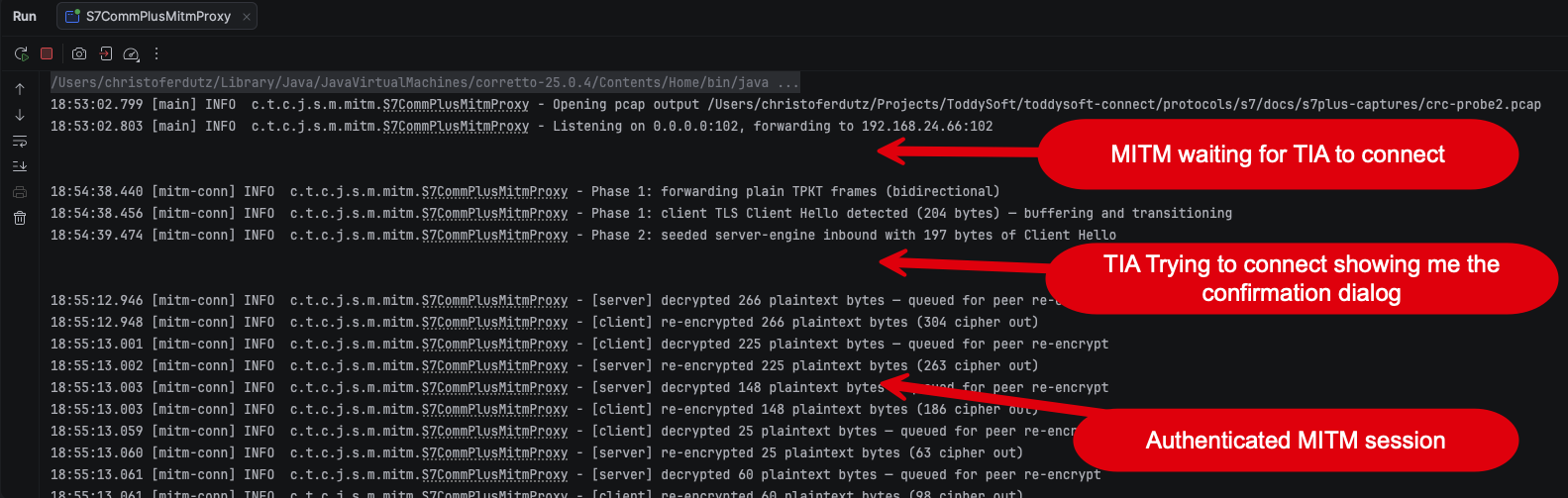
0.0.0.0:102 and forwards to the real CPU on 192.168.24.66, then walks the connection through its phases: plain TPKT frames first, the client’s TLS Client Hello detected and buffered, and from there every frame decrypted on one side and re-encrypted on the other — [server] decrypted 266 plaintext bytes … [client] re-encrypted 266 plaintext bytes. That pairing is the attack: both directions pass through the proxy in cleartext.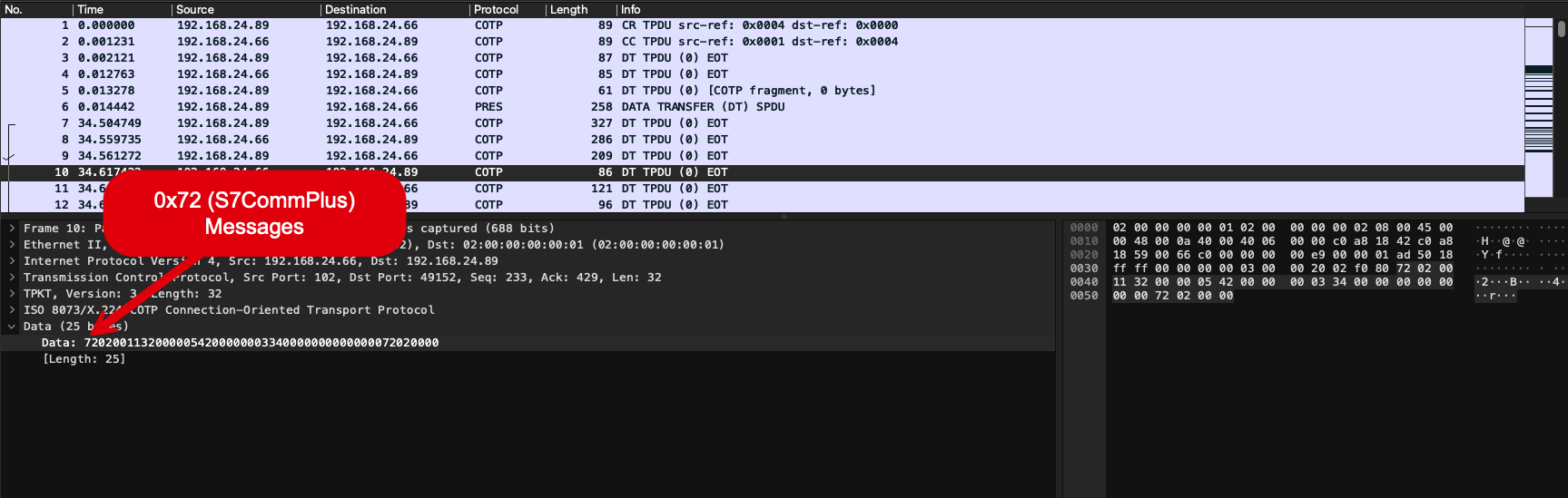
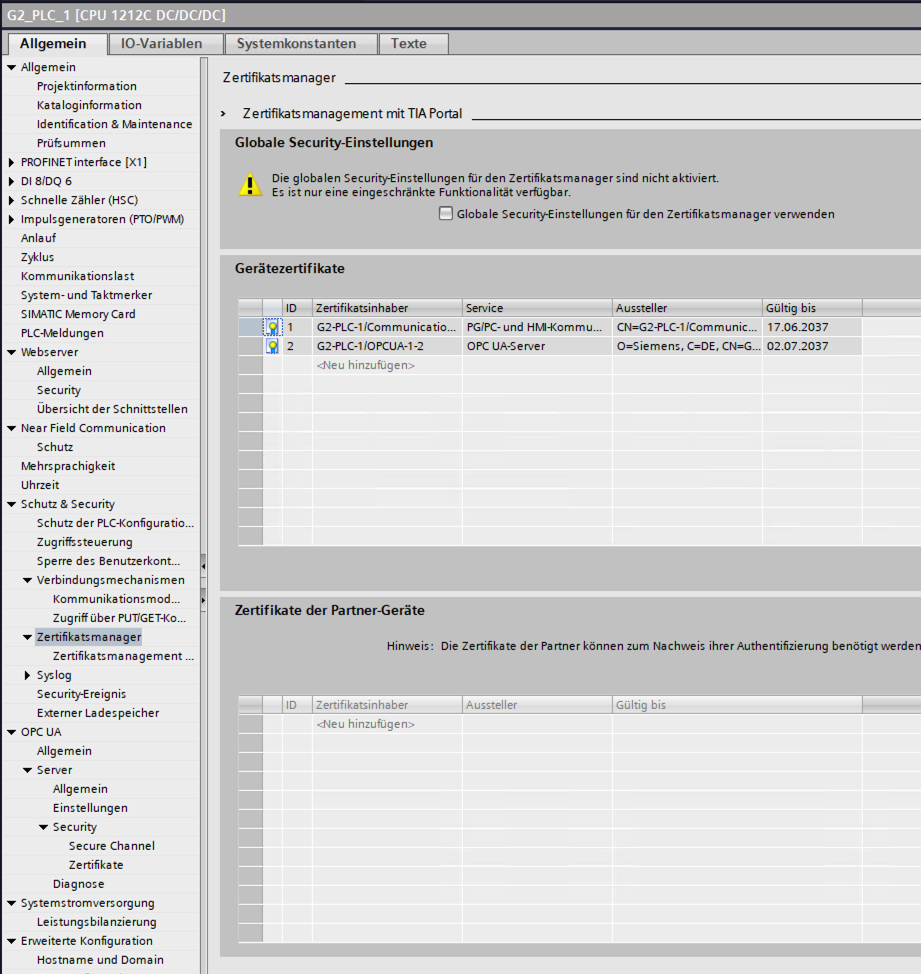
72 02 00 … — protocol id 0x72, an S7CommPlus message that was TLS-protected on the wire and is fully readable here.What a modern S7-1500/1200 presents on this channel depends on the model and on where in its life you meet it. Current models authenticate themselves with a manufacturer device certificate issued by Siemens' product PKI; where none is available the CPU falls back to a self-signed one. Siemens documents the sequence plainly in its own function manual.[1] "During commissioning, the CPU provides a manufacturer device certificate (if available) or a self-signed certificate that you must trust in order to establish a connection." The CPU on the bench here presented a self-signed certificate for PG/PC- und HMI-Kommunikation — visible in its certificate manager further down, where that entry is self-signed by the device while the OPC UA one is issued by Siemens.
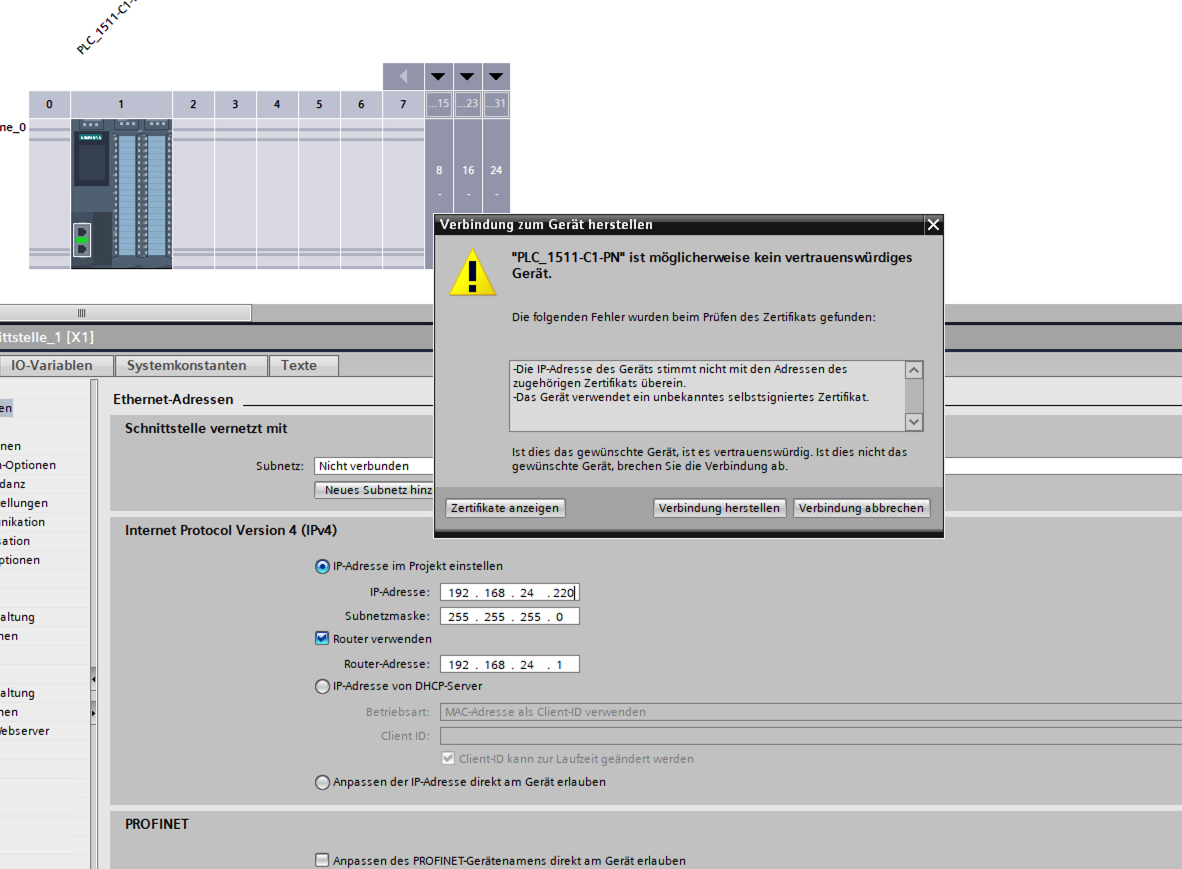
For this attack the distinction turns out not to matter, and that is the part worth holding on to: whichever certificate the CPU offers, the trust decision is made on the client, and most clients accept whatever certificate the peer offers. A manufacturer certificate is only worth as much as the validation performed against it. TIA Portal itself is a bit better than "accept silently": when I pointed it at my MITM it did raise a certificate-warning popup and asks the user whether to trust the device anyway. The dialog names exactly what it objected to, and it is worth reading closely, because it is not an issuer check against some expected Siemens authority — it is two much simpler tests: "Die IP-Adresse des Geräts stimmt nicht mit den Adressen des zugehörigen Zertifikats überein" (the device’s IP address does not match the addresses in its certificate) and "Das Gerät verwendet ein unbekanntes selbstsigniertes Zertifikat" (the device is using an unknown self-signed certificate). So TIA does a name/address match plus a "have I seen this self-signed certificate before" check.[2] That is meaningfully better than nothing — but it is still trust-on-first-use with a click-through warning, not certificate pinning: the human is free to click "trust," and any client that isn’t a human staring at a dialog (an automation runtime, a driver, a script) typically has no such prompt at all. So an attacker who can get on the wire between the client and the CPU can still do exactly what my MITM server did: terminate the TLS session, present their own certificate, and — once that one warning is dismissed or absent — transparently relay (and rewrite) the plaintext inside. The fact that this is a routine reverse-engineering technique is the point: unauthenticated TLS is still MITM-able. Encryption without endpoint authentication only raises the bar from "anyone on the wire can read it" to "anyone who can insert themselves on the wire can read it."
3. "But it is password-protected" — relaying the login
Surely the MITM can’t get past the password? It can, and this is the part that catches people out. S7CommPlus does not send the password in the clear — authentication is a challenge/response ("legitimation"): the CPU sends a challenge, the client returns a value derived from the password and that challenge. Against a passive eavesdropper that’s fine. Against an active MITM it collapses, because the authentication is not bound to the TLS channel — there is no channel binding and (per the previous section) no client certificate to tie the login to a specific endpoint. So the MITM simply relays the challenge/response: it forwards the CPU’s challenge to the real client, takes the client’s valid answer, and hands it back to the CPU. The controller now considers the session authenticated, the client believes it is talking to the CPU, and the proxy sits in the middle of a live, fully authenticated session it can read and inject commands into. The password authenticated the pipe — and the attacker owns the pipe. Layering a password on top of an unauthenticated channel adds exactly zero MITM resistance; it only stops the secret from appearing in plaintext.
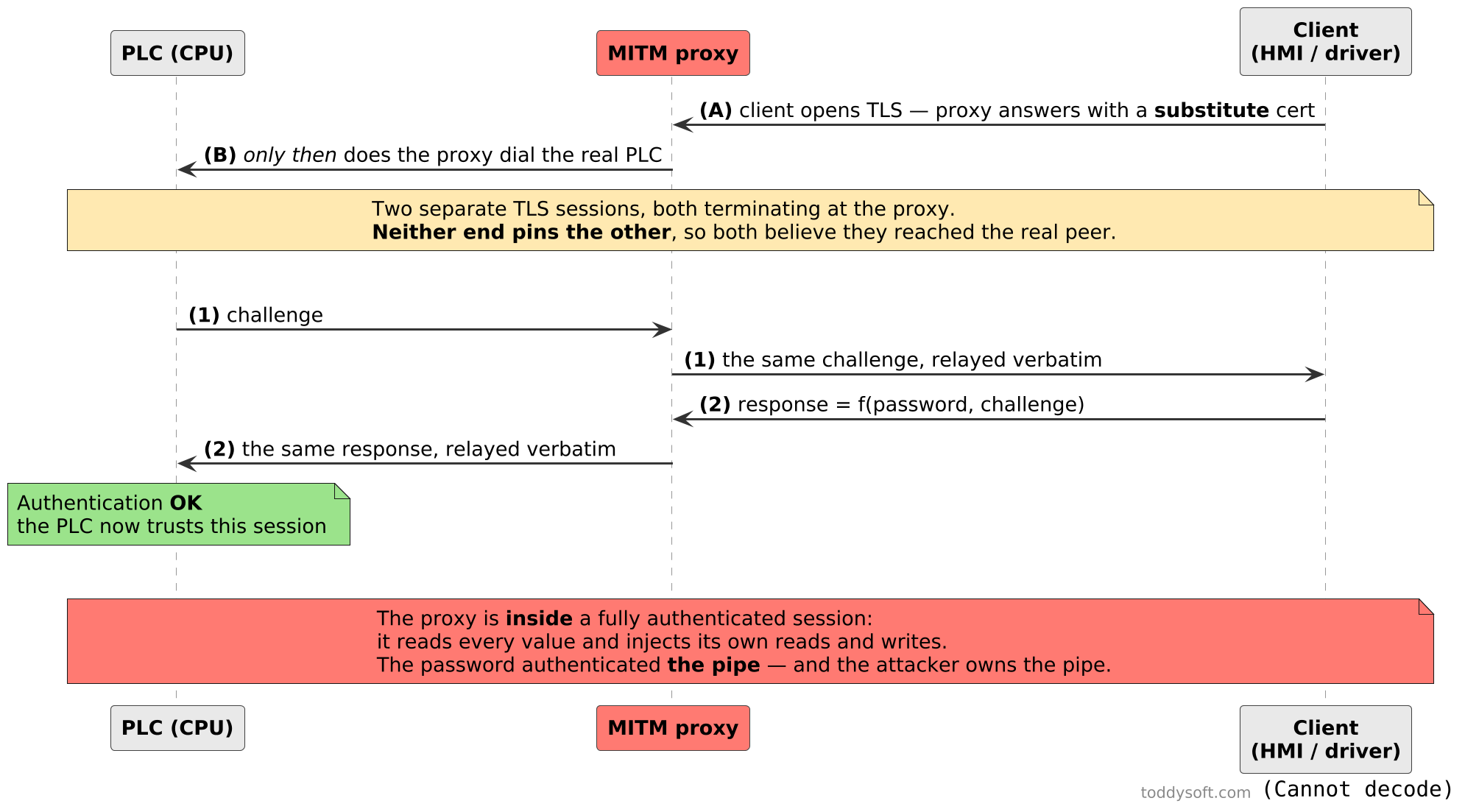
The attacker never needs the password itself: it only has to pass the two messages through. Because nothing binds the login to a specific TLS endpoint, a verbatim relay is a valid login — to the PLC the proxy is the client, and to the client the proxy is the PLC.
4. Harvesting the credential on the way through
Worse, the MITM doesn’t just ride the session — it can harvest the credential on the way through, because it sees the plaintext inside both tunnels. How much it harvests depends on which authentication arm the controller uses — and, importantly, that is decided by the device’s firmware, not by whether the connection is encrypted. There are two arms:
The legacy arm (older firmware) sends
SHA1(password) XOR challenge. The proxy already knows the challenge (it forwarded it), so it recoversSHA1(password)by a single XOR — no cracking required.The newer AES arm (recent firmware) wraps the response in AES instead, so the password doesn’t fall straight out — but the captured challenge/response pair is exactly what an offline dictionary attack needs, and the session hijack above works regardless.
It is tempting to assume the weak legacy arm only lives on ancient, plaintext V1/V2 controllers — but that is not the case, and this is the part worth flagging. Which arm a CPU uses is gated on its firmware version, and there is a band of modern, fully TLS-wrapped firmware that still authenticates with the SHA-1 legacy arm. I confirmed this on the bench: an S7-1500 on firmware V2.9.x, negotiating TLS 1.3 exactly like the newest devices, completed its login with the legacy SHA1(password) XOR challenge arm. So the direct-recovery attack is not a museum piece confined to the plaintext generation — it applies to encrypted, current-firmware sessions in that band too. Only the newest firmware (and the S7-1200 G2) moves to the AES arm.
And recovering SHA1(password) is not a consolation prize — it is the whole credential. The legacy login never uses the plaintext password directly; the only secret that goes into the response is SHA1(password). That makes the hash a password-equivalent: an attacker who has captured it can authenticate forever without ever cracking it, simply by computing SHA1(password) XOR challenge for each new challenge. A client that is built to take SHA1(password) as its authentication parameter doesn’t need the real password at all — the hash alone opens the door. (That it is also an unsalted, fast SHA-1 and therefore trivially brute-forced back to the plaintext is almost beside the point.) So the summary for this firmware band is: without endpoint authentication, an active man-in-the-middle can observe both the data and the login exchange inside TLS-wrapped S7CommPlus — and where the SHA-1 legacy arm is still in use, the value recovered can be replayed until the password is changed. The newest firmware and the S7-1200 G2 use the AES arm instead.
5. First, make TLS mandatory: the "only secure PG/PC and HMI communication" checkbox
Everything above assumes the conversation is inside a TLS tunnel at all — and on a CPU in its default configuration, that is the client’s choice, not the controller’s. Before pinning anything, close that gap.
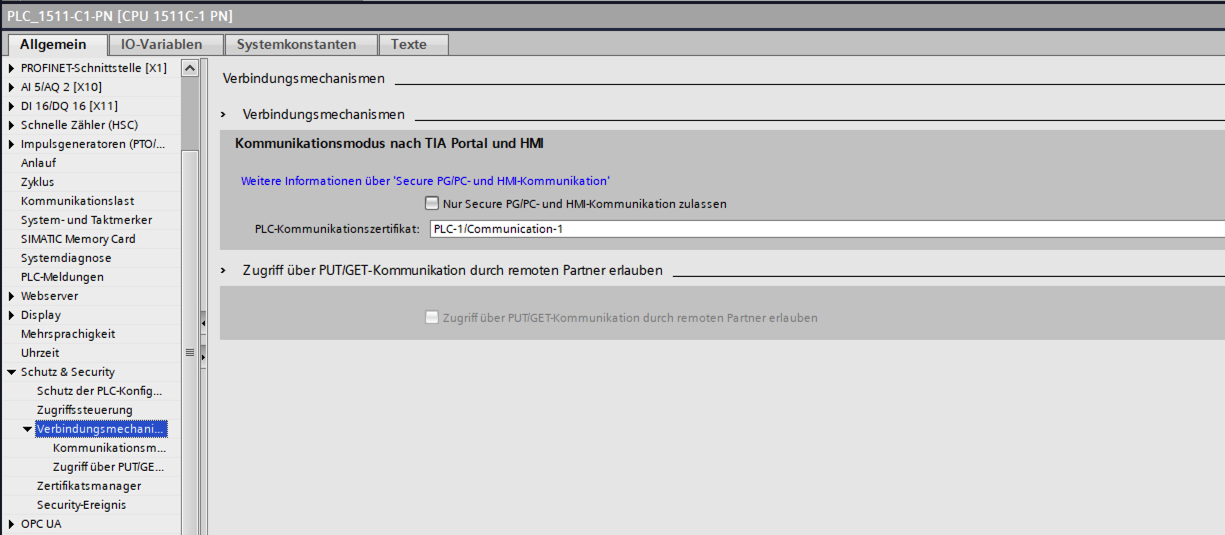
The setting lives on the same page as the PUT/GET checkbox: Protection & Security → Connection mechanisms → Communication mode with TIA Portal and HMI (Verbindungsmechanismen → Kommunikationsmodus nach TIA Portal und HMI), and it reads "Only allow secure PG/PC and HMI communication" ("Nur Secure PG/PC- und HMI-Kommunikation zulassen"). It is the checkbox visible — unticked — in the screenshot further down this chapter.
What it does — and this is Siemens' own description, not an inference. They confirm the reading directly: with the checkbox set, only TLS-wrapped S7+ is possible. The TIA Information System page the dialog links to states the choice plainly. You are setting "how the CPU may communicate with programming devices and HMI devices", and the two options are: "Nur über Secure PG/HMI-Kommunikation" (only via secure PG/HMI communication), or "Sowohl über Secure PG/HMI-Kommunikation als auch über die bisher verwendete PG/HMI-Kommunikation, kurz 'Legacy-PG/HMI-Kommunikation' genannt" — both the secure mechanism and the previously-used one. So with the box unticked the controller genuinely serves two mechanisms side by side, and each connecting client takes whichever it can speak.[3] Ticking the box removes the second mechanism — the CPU then accepts only the TLS-secured one. The certificate it presents in that handshake is the PLC communication certificate shown right below the checkbox, and its purpose is fixed to TLS server.
The compatibility topic spells out the resulting matrix, and the last row is the one to sit with: a V17-or-later CPU with several PGs and HMIs attached, some current and some older, uses "TLS+Legacy-Verfahren" — both at once — "vorausgesetzt, Sie haben in den CPU-Eigenschaften die Option 'Nur secure PG/PC- und HMI-Kommunikation zulassen' deaktiviert". One controller, two PG/HMI mechanisms live simultaneously, one of them unencrypted, for as long as that box stays unticked. Siemens also notes that from TIA V17 with an S7-1500 from V2.9 or an S7-1200 from V4.5 the partners negotiate "automatisch das höchstmögliche Security-Verfahren" — the highest security procedure available to both — so the default on a modern pairing is TLS. The exposure is not the default; it is what the default silently tolerates alongside itself.
And the insecure path is not hypothetical — the engineering tool ships a switch for it. TIA Portal has a menu item, Online → "Nur Legacy PG/PC-Kommunikation verwenden" (use only legacy PG/PC communication). Tick it and, in Siemens' words, "Alle Online-Verbindungen werden wie bei TIA Portal-Versionen < V17 aufgebaut" — every online connection is built the way pre-V17 versions did it. The setting is session-scoped and resets when a project is opened, so it is a deliberate act rather than a lasting misconfiguration. Two details make it worth knowing about. Its documented prerequisite is that the CPU option "Nur Secure PG/PC- und HMI-Kommunikation zulassen" is not activated — which is the cleanest possible confirmation of what the checkbox does, from the other side. And the stated motivation is not security at all: legacy exists because the secure mechanism "die Übertragungsgeschwindigkeit bei CPUs mit geringerer Kommunikations-Performance beeinträchtigen kann" — it can hurt throughput on CPUs with weaker communication performance — with the suggested use being a protected environment such as commissioning. That is a defensible engineering trade-off, stated honestly. It is also, on an unticked CPU, a one-click downgrade to a cleartext channel, available to anyone at the engineering station. (Siemens does put one guard on it: with legacy-only active you cannot set, change or delete the confidential-configuration password online.)
On the newest hardware there is nothing left to tick. On the S7-1200 G2 this checkbox is grayed out and ticked — secure PG/PC and HMI communication is mandatory rather than a default you could relax. Bench-confirmed 2026-07-30 and re-checked 2026-07-31 after enabling the anonymous user, in case the box were merely gated behind an identity the way the PUT/GET permit is; it is not, it stays grayed. Confirmed from the other side too: a probe that opens a COTP connection on SIMATIC-ROOT-HMI and sends an unencrypted S7CommPlus session-setup gets a genuine protocol reply — a CreateObject response, so the frame was parsed and processed — carrying a non-zero error code. The controller understands the request perfectly and declines to create the session, because on that generation there is no unencrypted presentation to fall back to.
That is worth crediting plainly: on the G2 Siemens did not merely provide a switch, they removed the choice. It also sharpens rather than softens the argument of this chapter. The two ends of the range are fine — old CPUs that cannot reach the bar (no such setting exists) and new CPUs that cannot miss it (no such setting to turn off). The risk lives in the middle: the large population of S7-1500s and classic S7-1200s where the mode is real, togglable, and off unless somebody ticked it.
Read the label, though — it is an admission. Before the mechanics, notice what Siemens chose to call this. The feature is named "Secure PG/PC and HMI communication," and the checkbox offers to allow only that. Nomenclature like that partitions the world: if the TLS-wrapped conversation is the secure PG/PC and HMI communication, then everything this checkbox shuts out — every variant that runs in the clear, V1, V2 and V3 alike — is, in the vendor’s own vocabulary, the non-secure PG/PC and HMI communication. Siemens nowhere says "S7CommPlus without TLS is insecure" in those words, and it does not have to: the option is only meaningful as a choice between a secure mode and something else, and Siemens named which is which. That reading is worth making explicit for two reasons. First, it means the argument of this chapter is not a third-party claim the vendor disputes — the naming on their own dialog concedes the point. Second, and less comfortably, the bar Siemens sets here is one an enormous part of the installed base cannot reach: the setting only exists on firmware new enough to speak TLS-wrapped S7CommPlus (S7-1500 from V2.9, S7-1200 from V4.5). Every S7-300 and S7-400, and every S7-1500/1200 below those versions, is permanently on the side of the line the label calls not-secure, with no checkbox available to cross it. For those devices the network boundary is not defense in depth; it is the entire defense. And it sharpens the protocol picture the companion article lays out: of the five native-channel variants an S7 CPU may speak, exactly one is on the secure side of Siemens' own naming.
Why it matters more than it looks. Leaving it unticked means the CPU keeps serving the unencrypted mechanism alongside TLS, so the connecting client — including an unwanted one — decides whether the session is encrypted. As noted above, a modern pairing from TIA V17 negotiates TLS by default; the exposure is what that default keeps tolerating beside itself. Everything in this chapter — the confidentiality TLS buys you, the fingerprint you pinned, the certificate you had your CA issue — protects the TLS conversation, and none of it applies to a client that simply doesn’t ask for TLS. A rogue host on the segment doesn’t have to defeat your pinning; it can bypass the whole envelope by connecting in the clear, and on a CPU in the legacy authentication band that plaintext login hands the SHA1(password) credential to anyone sniffing the wire, with no MITM required at all. So this checkbox is not a nice-to-have alongside pinning — it is the precondition that makes pinning meaningful. Pinning without it locks the front door while leaving the side door on the latch.
What it does not do, because the limits matter as much as the benefit:
It does not authenticate the client. This is still the one-way handshake described in the next section: the CPU proves who it is, and any host that can reach the port may still try its luck with a password. Forcing TLS narrows how a client may connect, never which client may connect.
It does not cover PUT/GET. Legacy S7Comm (
0x32) is governed by its own checkbox on the very same page and remains plaintext regardless. Force TLS and disable PUT/GET, or you have locked one door on a two-door room.It does not change the authentication arm. A CPU in the V2.9-era band still logs in with the SHA-1 legacy arm — now inside a mandatory tunnel, which is exactly the improvement, but the credential itself is no stronger.
It does not gate tag access. Every native-channel client that gets through still sees the permissive runtime surface the companion article documents — the per-tag attributes the native channel ignores, the access levels that all permit writing; it just has to bring a TLS stack.
What it costs. This is the setting with real breakage attached, so plan it rather than tick it blind: anything that cannot speak TLS-wrapped S7CommPlus stops connecting. That means older TIA Portal versions, older HMI panels and WinCC releases, and third-party or open-source tooling built on plaintext S7CommPlus or classic S7Comm. The CPU also needs its communication certificate in place, and clients need to accept it (or its CA). Inventory what talks to the controller first — the failure mode is an HMI that goes dark, not an error dialog explaining why. Siemens' own compatibility topic is explicit about which side falls back: "PG/HMI kommt aus einer Vorgänger-Version (< V17): Legacy-Verfahren wird verwendet" — a pre-V17 programming device or HMI runtime uses the legacy mechanism, and therefore stops being able to reach a CPU once you tick the box. The secure mechanism arrived with TIA V17 and needs, on the controller side, an S7-1500 from V2.9, an S7-1200 from V4.5, a Software Controller from V21.9, a SIMATIC Drive Controller from V2.9 or PLCSim / PLCSim Advanced V4.0; on the HMI side it needs updated WinCC Basic / Comfort / Advanced, WinCC RT Professional or WinCC Unified components (and SINAMICS RT SW from V6.1, STARTDRIVE from V17).[4]
For what it is worth, ToddySoft Connect's own S7 driver is unaffected by ticking it: it already speaks TLS-wrapped S7CommPlus and pins the controller fingerprint. That is the posture you want from every client on the channel — and this checkbox is how you stop accepting anything less.
6. Pinning: the one direction you can actually use
The fix is to pin the certificate fingerprints. In principle you’d want this in both directions — the client authenticating the controller, and the controller authenticating the client. It turns out only one of those two directions is actually available to you on the S7 channel, and that asymmetry is worth dwelling on.
Client authenticates the controller (downstream — and the only direction you can actually use). Capture the controller’s leaf-certificate SHA-256 fingerprint once, over a trusted path, and pin it in the client so the connection is refused the moment it sees any other certificate. This is entirely in the operator’s control, needs no change on the CPU, and defeats the MITM above outright. In ToddySoft Connect’s S7 driver this is the
tls-pinned-fingerprintsoption — the driver logs the observed fingerprint on every connect so you can capture and pin it — but the principle is universal: pin the certificate, don’t trust-on-first-use forever.Controller authenticates the client (upstream — and here is the bad news). The stronger posture would be to also make the CPU refuse clients it doesn’t recognize, so a rogue host on the segment can’t even open a session — the CPU holding an allow-list of trusted client certificates and rejecting any TLS handshake that doesn’t present one. This is completely standard TLS: mutual authentication (mTLS) has been a first-class feature of the protocol for decades, and the S7-1500/1200 already carry all the machinery to do it — a full certificate manager, a device keystore, trusted-partner certificate lists. Siemens even uses exactly this pattern on the same controller for other channels — though not always via TLS: the on-board OPC UA server can be configured with a trusted-clients list so it only accepts clients whose certificate you’ve imported (OPC UA performs that certificate exchange in its own UA SecureChannel rather than in a TLS handshake — a different mechanism, but precisely the operator-facing capability that is missing here), and Secure Open User Communication (
TCON_IP_V4_SEC) authenticates its partner by certificate. But for the S7CommPlus / PG-HMI channel — the native S7 protocol this whole article is about — client-certificate authentication is simply not implemented at all. There is no allow-list, no place in TIA Portal to say "only this client may connect," noTLSClientCertReffor the PG/HMI TLS session. The TLS handshake authenticates the server (the PLC) to the client and stops there; the connecting client is gated only by the S7CommPlus password / access-level "legitimation" inside the tunnel, never by a certificate at the TLS layer.
This is a real limitation, and it deserves to be stated plainly. Certificate pinning is the one mechanism that stops the MITM I described above — and on the S7 protocol it is a one-way street. The operator can pin the controller from the client side (do this — it is real protection), but the PG/HMI channel does not currently provide a trusted-clients list, so client-certificate authentication cannot be configured on that channel today. Any host that can reach the CPU on the network, get past the network boundary, and satisfy the password/access-level check can open an S7CommPlus session — the controller will never demand a client certificate, because the feature to do so does not exist on this channel. The building blocks are all present on the device; the capability is just missing where it would matter most. Until Siemens closes that gap, mutual authentication on the native S7 protocol is off the table, and the network boundary plus downstream (client-side) pinning are the only tools you actually have.
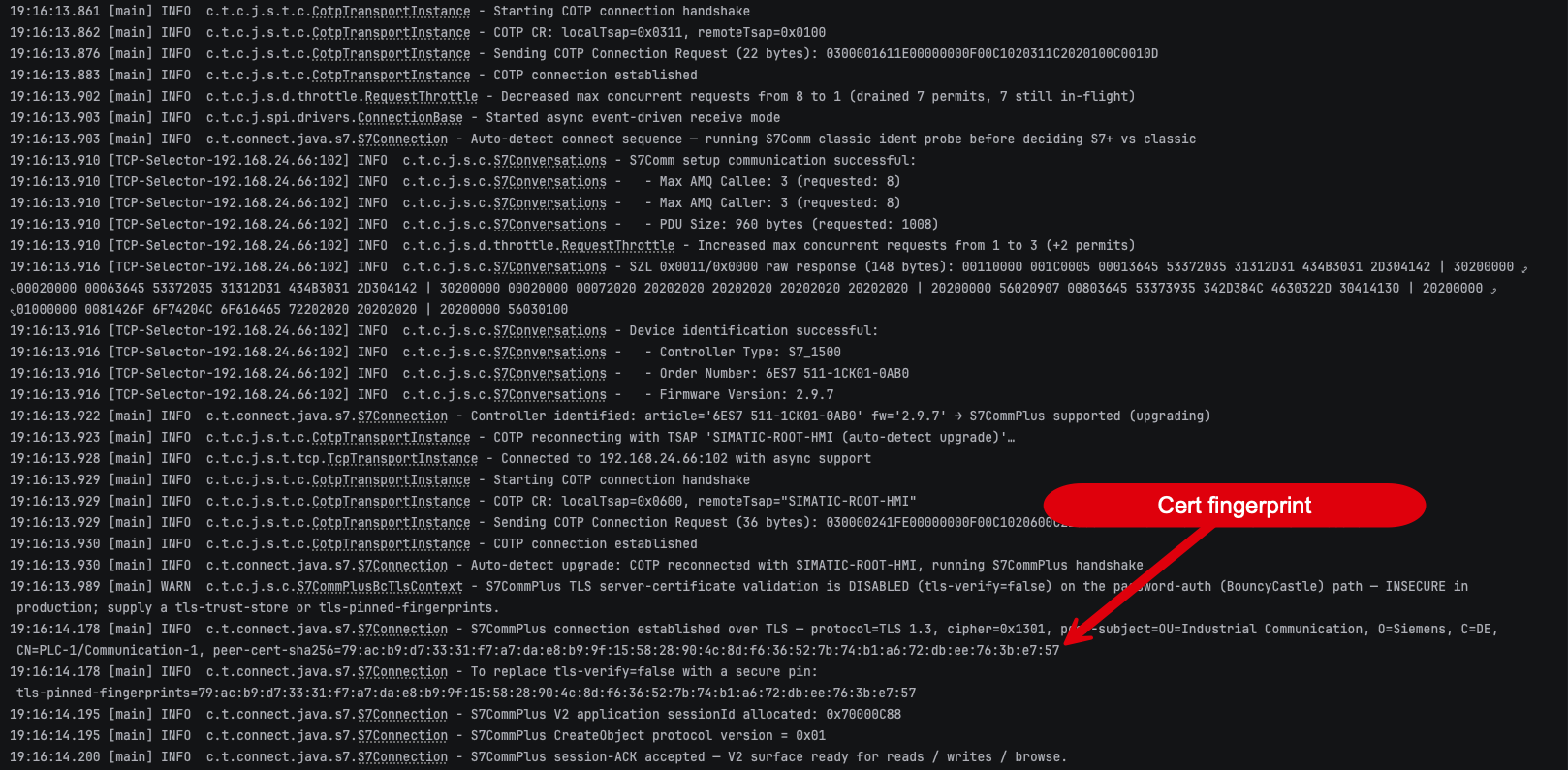
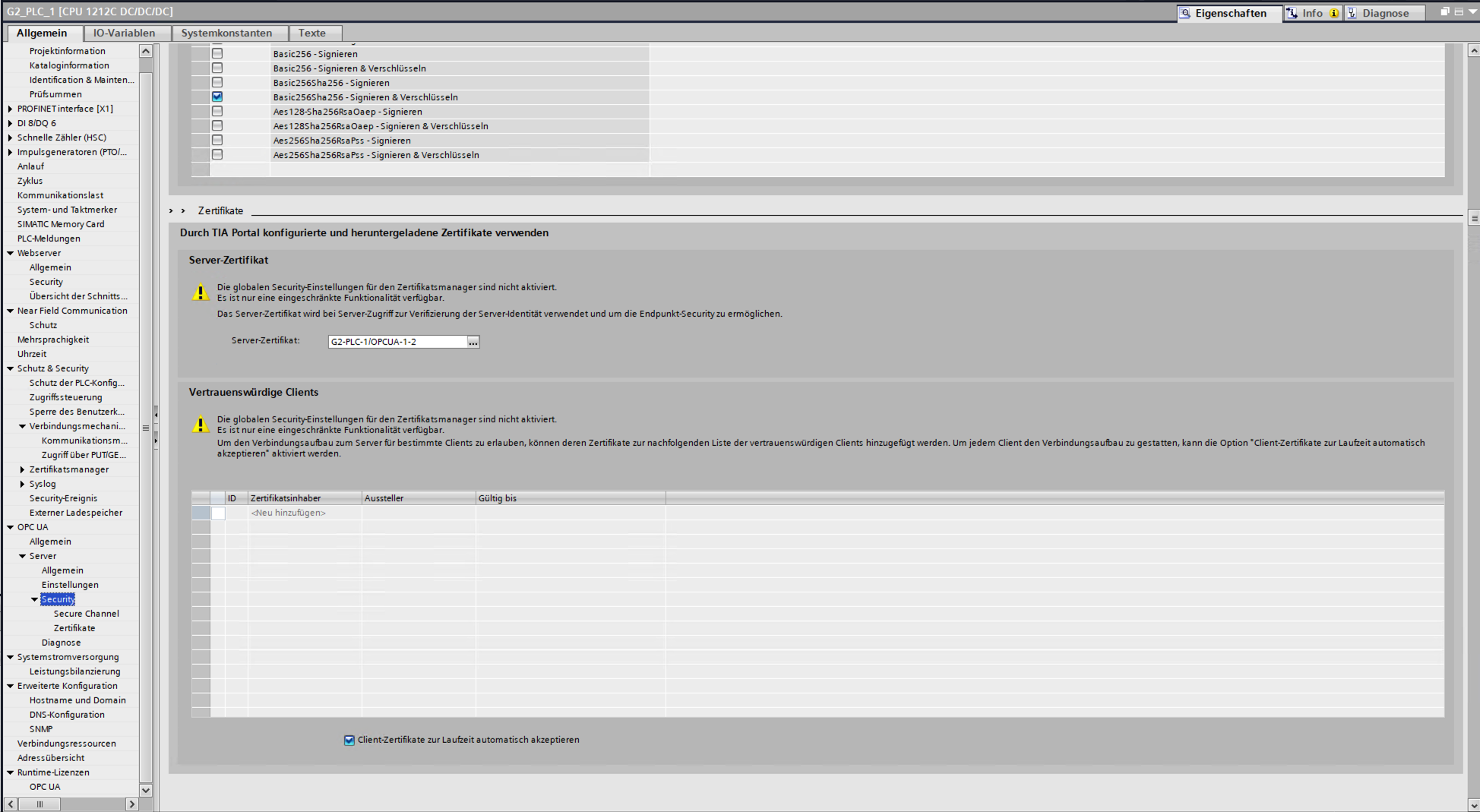
S7_1500, 6ES7 511-1CK01-0AB0, firmware 2.9.7), reconnects on the SIMATIC-ROOT-HMI TSAP and negotiates TLS 1.3. Three lines matter. It warns that server-certificate validation is off by default (tls-verify=false … INSECURE in production) rather than failing silently. It logs what it actually saw — peer-subject=OU=Industrial Communication, O=Siemens, C=DE, CN=PLC-1/Communication-1 (the same PLC-1/Communication-1 certificate the CPU’s Verbindungsmechanismen page names) together with the leaf peer-cert-sha256. And it then prints the exact line to paste back into the connection string — tls-pinned-fingerprints=79:ac:b9:…:e7:57. Capture that fingerprint over a trusted path once, pin it, and the MITM three figures ago cannot stand up.The asymmetry is easiest to see by putting the two dialogs side by side on the same CPU. The OPC UA server has a Vertrauenswürdige Clients (trusted clients) list: add a client’s certificate there and only that client may connect — the CPU is authenticating its peers. The S7 / PG-HMI page has no such list. It offers exactly one certificate setting, the PLC-Kommunikationszertifikat — and that is the certificate the PLC presents to you, not one it demands from anybody.
7. From a pinned fingerprint to a real CA
Pinning the self-generated certificate that the PLC produces by default is the quick, low-ceremony way to get the downstream direction working, and it is a genuine improvement. But the cleaner, more scalable posture is to stop relying on those self-signed certs altogether and stand up a proper certificate authority — an internal company CA (or an external one) — that issues an explicitly created device certificate you install on the controller, and configure the client to trust the CA rather than one hard-coded fingerprint. A PKI buys you what per-fingerprint pinning cannot: you can rotate, renew and revoke the controller’s certificate without hand-editing a pinned hash on every client, and onboarding the next controller is "issue it a certificate from the CA" instead of "capture and distribute another fingerprint." For a single bench device, pinning the self-signed cert is fine; for a plant full of controllers, a trust authority with explicitly issued certificates is the option that actually scales.
And this is actually possible on the hardware — you are not stuck with the device’s self-signed default. TIA Portal’s certificate manager lets you bring in your own trust authority: you can import an external/company CA certificate into the CPU’s certificate store, and then install a device certificate signed by that CA rather than the auto-generated self-signed one — either by importing a device certificate together with its private key (e.g. a PKCS#12 / .p12 file) or, cleaner, by having the CPU’s certificate signed by your CA and assigning it as the device certificate used for secure PG/HMI, the web server and OPC UA.[5] The controllers you deploy after that present a certificate that chains to a CA your clients already trust, so a client can validate the whole chain instead of pinning one leaf fingerprint per device.
There is one window where none of this is available yet, and Siemens is refreshingly direct about it. A CPU only receives its production certificate when the project is downloaded, so the very first download is secured with the CPU’s manufacturer device certificate "falls vorhanden" — if present — or a self-signed one. The connection is TLS, but the client has nothing to validate it against. Siemens' documented prerequisite for that first download is therefore physical: "Programmiergerät und CPU sind direkt miteinander verbunden und befinden sich in einer geschützten Umgebung" — directly connected, in a protected environment, so that you can identify the CPU being loaded and control the link.[3] The CPU advertises this state (the Bereitstellungsphase, provisioning phase) in its diagnostic buffer and is only "eingeschränkt nutzbar" until the confidential-configuration password — the Vertrauliche PLC-Konfigurationsdaten schützen option in the CPU’s properties — completes it. In other words: the vendor’s own answer to "how do you bootstrap trust in the certificate?" is control the wire while you do it — the same answer this article reaches for fingerprint provenance, and a reminder that commissioning is a security-relevant phase rather than a formality. Worth noting too what Siemens says about skipping that password entirely: the confidential configuration data, "z. B. private Schlüssel" — the private keys — are then "kaum vor unbefugtem Zugriff geschützt", barely protected against unauthorized access.
Note what a CA does not fix, though: it changes how conveniently you manage the controller’s certificate, but it cannot manufacture the missing upstream enforcement. Even with a full company PKI and a per-client certificate issued to every legitimate client, the S7CommPlus / PG-HMI channel still never asks the client to present one — so a CA improves the direction that already works and does nothing for the direction the channel does not support today. The moment the S7 channel does gain a trusted-client capability, a PKI is exactly what you’d want backing it; today there is simply nothing on that side of the handshake for a CA to authenticate.
8. Two caveats
Siemens documents this problem in its own words, which is worth quoting, because it is easy to assume a vendor would rather not dwell on it. The certificate-tip topic in the TIA Information System sets out three ways a programming device can come to trust a CPU’s device certificate: the certificate is already in the project (validation runs "automatisch und ohne Rückfrage"), it is not in the project — for instance when the CPU was found via Erreichbare Teilnehmer — in which case TIA asks the user, or a CA certificate covers every CPU on the network. About that middle case, the documentation says: "Möglicherweise ist das nur mit großem Aufwand möglich, weil die CPU z. B. nicht in Sichtweite ist und daher die Authentizität nicht unmittelbar geprüft werden kann." — it may only be possible with great effort, because the CPU is not in view and its authenticity therefore cannot be checked directly.[3]
That is the trust-on-first-use problem stated by the vendor: the dialog asks a question the operator frequently has no way to answer. Which is exactly why the answer has to be a fingerprint or a CA captured over a path you control, not a click.
The same topic also shows the CPU-authentication side is better equipped than it first appears: TIA maintains a certificate revocation list — drop a device certificate into C:\ProgramData\Siemens\Automation\Certstore\CRL, restart, and TIA will challenge any connection to a CPU presenting it — and a company CA can be installed for automatic validation by copying it to …\Certstore\Trusted. Both are worth setting up, and both are still the downstream direction: they are how your client judges the controller. Nothing here changes what the controller demands of the client.
Two caveats. Pinning is only as trustworthy as the fingerprint’s provenance: capture it out of band (physically at the panel, from the TIA project, or from a known-good first connection on an isolated network) — never from the very network you are trying to protect. And treat pinning as complementary to the firewall, not a substitute — it stops impersonation and rogue clients, but the network boundary is still what keeps the packets away in the first place.
9. What pinning assumes: that the key is still the controller’s
A pinned fingerprint binds you to one specific certificate, which is exactly the point — a proxy presenting its own certificate fails the check. But it also means the whole control rests on an assumption worth making explicit: that nobody else can obtain the controller’s private key. An attacker who holds it presents the genuine certificate, the fingerprint matches, and pinning is simply not in the conversation.
That is not a theoretical worry. At Black Hat USA 2024, a Technion team presented "Nope, S7ill not Secure: Stealing Private Keys From S7 PLCs", in which a hardware-configuration upload returns the PLC’s private key.[6]
The status matters, and it is better than the headline suggests. Per Siemens, they were present when the work was disclosed at the conference, and the position agreed there was that the vector was already closed at the time — because the protection had shipped years earlier. It is the option this article has already met, in the chapter on moving from a pinned fingerprint to a real CA: "Vertrauliche PLC-Konfigurationsdaten schützen", the confidential-configuration-data password, available from TIA V17 on an S7-1500 from V2.9 and an S7-1200 from V4.x. From TIA V21 a further option extends that protection to the entire configuration, on the S7-1200 G2. So the correct tense here is the past one, and the correct scope is old projects and old firmware rather than the band this article is about.
Which retroactively sharpens something Siemens' own documentation says about skipping that password — that the confidential configuration data, "z. B. private Schlüssel", is then "kaum vor unbefugtem Zugriff geschützt". Read once, that is boilerplate. Read next to a paper that turned exactly that gap into six attacks, it is a specification of what the password is for. Setting it is not hygiene, it is the control that keeps a pinned fingerprint meaningful — and on the firmware band above, a CPU stays "eingeschränkt nutzbar" until you do.
For an operator the practical shape is unchanged from everything else in this article: pin the fingerprint, set the confidential-configuration password, and do not run a CPU below the firmware band where both are available. What this section adds is why the second of those is not optional — without it, the first one is protecting a secret that is not secret. Put it as a rule rather than a nuance: a pinned fingerprint on a CPU whose confidential configuration is left unprotected is false assurance, not protection. The key behind the pin can be lifted along the configuration path that research describes, and a pin on a key someone else can hold defends nothing. Set the confidential-configuration password, or do not count the pin as a control at all.
Two limits on the paragraph above, since it concerns someone else’s research. The remediation status is Siemens' own position, not a published advisory: the finding is not classified as a vulnerability and carries no CVE or SSA number I can point you at, so there is no document to cite alongside it. And I have not reproduced any of the six attacks — this section reports what the paper claims and what the vendor says about it, nothing more. |
10. Where to go next
One Tag, Three Checkboxes, Two Answers is the sharpest single illustration of what gets through an authenticated-but-unconstrained channel: three per-variable checkboxes that read like runtime access control, enforced on OPC UA and the web API, and ignored outright by the native protocol this article is about.
Three Doors into the Same Controller is the groundwork — why the native channel is two unrelated protocols on one port, and which surfaces carry transport security at all.
Security That Lives in the Tool, Not the PLC draws the wider pattern, and picks up one consequence of this article directly: a check the engineering tool performs on data the controller handed it is only ever as trustworthy as the channel that carried it — and this channel, as shown above, is one an attacker can sit in the middle of.
The other half of the picture is what the controller enforces once a client is through the door, and the short answer is less than the labels suggest. The per-tag Accessible / Writable / Visible in HMI Engineering attributes are honoured by OPC UA and the Web API but ignored outright by the native channel — that is One Tag, Three Checkboxes, Two Answers — and every access level from HMI access upward permits writing runtime tags, including the one Siemens calls read access.
Taken together the two articles make a single argument. This one says the pipe can be encrypted but not authenticated in the direction that would keep strangers out. That one says that once a client is on the pipe, the controller’s own permission model does very little to constrain what it can do. Neither is catastrophic on its own. The combination is why the network boundary is still carrying far more weight than most operators realize.
Read Access Doesn’t Mean Read-Only: What the S7 Protection Levels Gate is the settings companion: the four global levels, the named-user model that replaces them on the newest CPUs, and what each actually gates once you watch it on the wire.
11. About
ToddySoft Connect is an industrial connectivity library: a set of protocol drivers that let applications read, write, browse and subscribe to data on automation hardware. Everything measured in this series was measured with it — the S7 driver first, and later the S7 Web API driver, which began as a way to verify a single claim in these articles and turned into a second Siemens driver in its own right. The bench behind the numbers is real hardware: S7-1500, S7-1200 and S7-1200 G2 controllers, plus an S7-300 for the cases where the answer is "that generation does not do this at all".
Christofer Dutz has spent more than a decade on industrial protocols and IT/OT integration, much of it in open source. Questions, corrections and war stories are welcome — particularly corrections: several findings in this series were sharpened by people who knew more about a corner of it than he did.
On the writing: this series took shape over about seven weeks and was restructured, split and rewritten far more often than anyone would manage by hand — what began as one article ended up as six. An AI assistant did the heavy lifting on the prose. It decided nothing: every finding, every number and every conclusion here came off the bench first and was checked back against it afterward. Where the text and the hardware disagreed, the hardware won.