· Security · 27 min read
One Tag, Three Checkboxes, Two Answers: The S7 Per-Tag Access Attributes
Three checkboxes on every S7 data-block variable read like runtime access control. Two bind only the OPC UA and Web API doors, the third never leaves the engineering tool, and the protocol most HMI and SCADA traffic travels over honours none of them.
Every variable in an S7 data block carries three access checkboxes: Accessible from HMI/OPC UA/Web API, Writable from HMI/OPC UA/Web API, and Visible in HMI Engineering. They read like runtime access control enforced by the controller. Two of them bind only the two standards-based doors — OPC UA and the Web API — the third never leaves the engineering tool, and the protocol that most HMI and SCADA traffic actually travels over honours none of them. This article shows the same tag, on the same CPU, answering two different ways depending only on which door you knock at.
1. Where this fits
This is the finding that started a short series on what Siemens' S7 security settings actually enforce. Its companions are Three Doors into the Same Controller, which maps the several unrelated protocols an S7 CPU answers on and is worth reading first if the phrase "the native channel" is not already familiar, and Encrypted, but Not Authenticated, on what TLS does and does not buy you on that native channel.
The one piece of background this article needs: an S7-1500 or S7-1200 answers on three quite different application surfaces. There is the native S7 channel — ISO-on-TCP on port 102, what TIA Portal, SIMATIC HMI panels, WinCC, and most industrial drivers use — and beside it two standards-based doors that are routinely spoken of as one: the OPC UA server on 4840, and the Web API behind the web server on 443. All three are separate implementations inside the controller, and as this article shows, they do not agree about what these three checkboxes mean.
This finding was reported to Siemens ProductCERT and is published in coordination with them.
Verdict — channel-scoped, mostly tool-side. Accessible and Writable bind OPC UA and the Web API only; Visible in HMI Engineering is a TIA-only filter; the native channel honours none of the three — neither S7CommPlus nor legacy S7Comm.
This is the subtle one, and the finding that started the whole series. It is also where I had to correct my own first assumption, so bear with a slightly longer walk-through — the screenshots do most of the work.
Every DB member carries not two but three per-variable attributes in the block interface editor:
Accessible from HMI/OPC UA/Web API (German: Erreichbar aus HMI/OPC UA/Web API)
Writable from HMI/OPC UA/Web API (German: Schreibbar aus HMI/OPC UA/Web API)
Visible in HMI Engineering (German: Sichtbar in HMI Engineering)
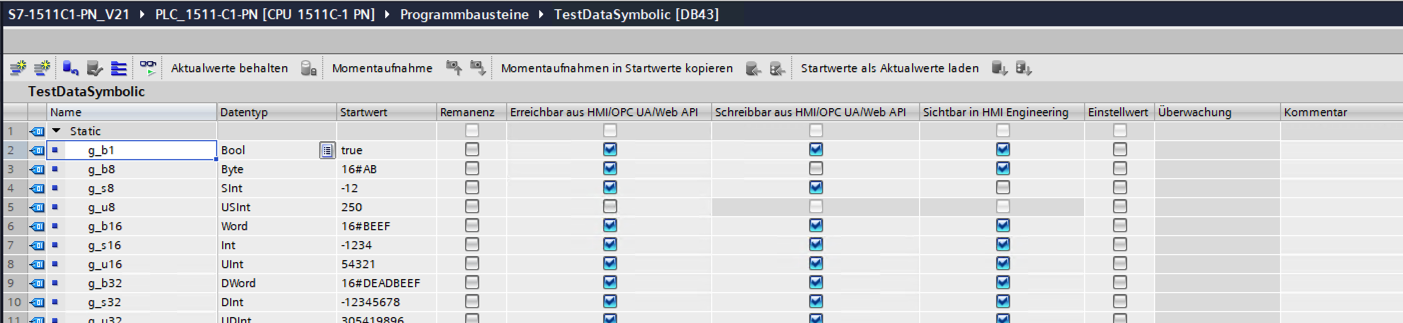
TestDataSymbolic, DB43). g_b8 is not writable, g_s8 is not visible, g_u8 is neither accessible nor visible.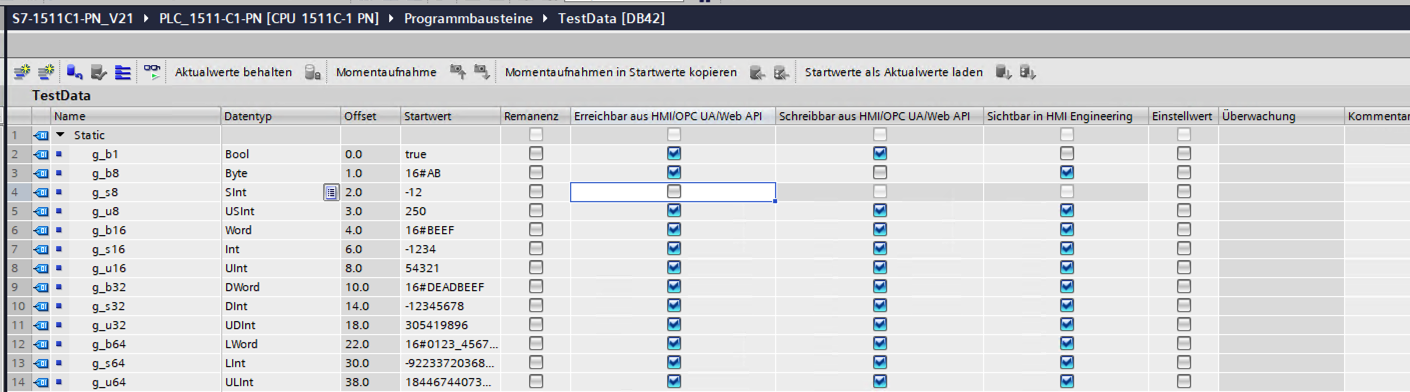
TestData, DB42) — the behavior discussed here is independent of the block-access mode.Reading those labels, you would reasonably expect them to be runtime controls enforced by the PLC against anything Siemens calls "HMI." What the evidence below shows is narrower and more surprising: two of the three are enforced only on the OPC UA server and the Web API — the two standards-based doors — the third is enforced only inside the TIA engineering tool, and the controller enforces none of them on either of the native protocols — modern S7CommPlus, the HMI-panel path, or legacy S7Comm.
2. What the standards-based doors do: both enforce Accessible + Writable
On the OPC UA server and on the Web API, Accessible and Writable behave exactly as their labels promise. Both were measured separately, on different clients — and they agree completely, which is the finding here rather than a detail of it.
OPC UA. Enforced by the CPU’s own server, not by tooling: a plain third-party client (UaExpert, anonymous, no WinCC in the path) sees it too.
A tag marked not accessible (
g_u8) is absent from the OPC UA address space.A tag marked not writable (
g_b8) returnsBad_NotWritableon a write.
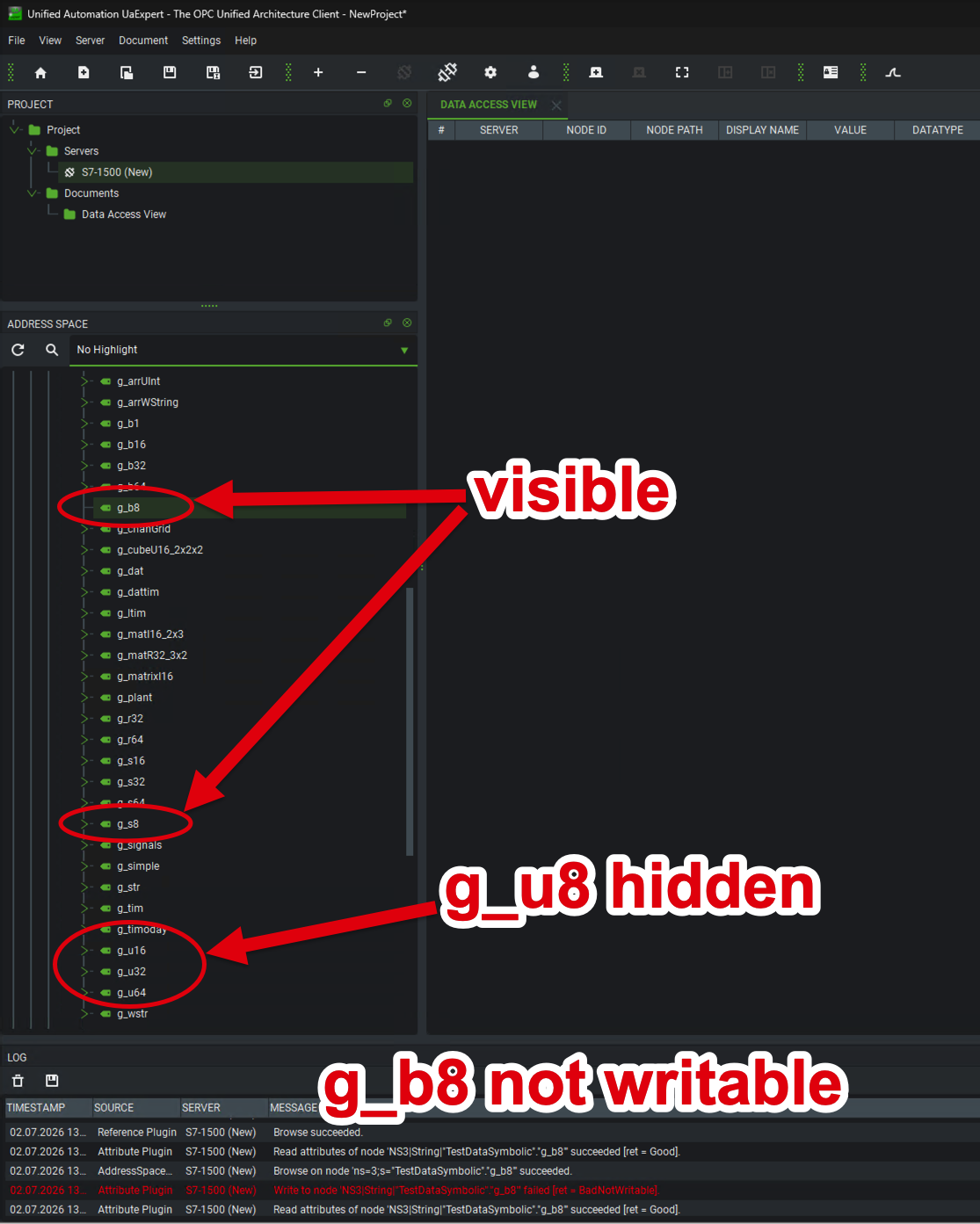
g_b8/g_s8 are present ("visible"), g_u8 is absent from the address space, and a write to g_b8 fails with BadNotWritable (log, bottom).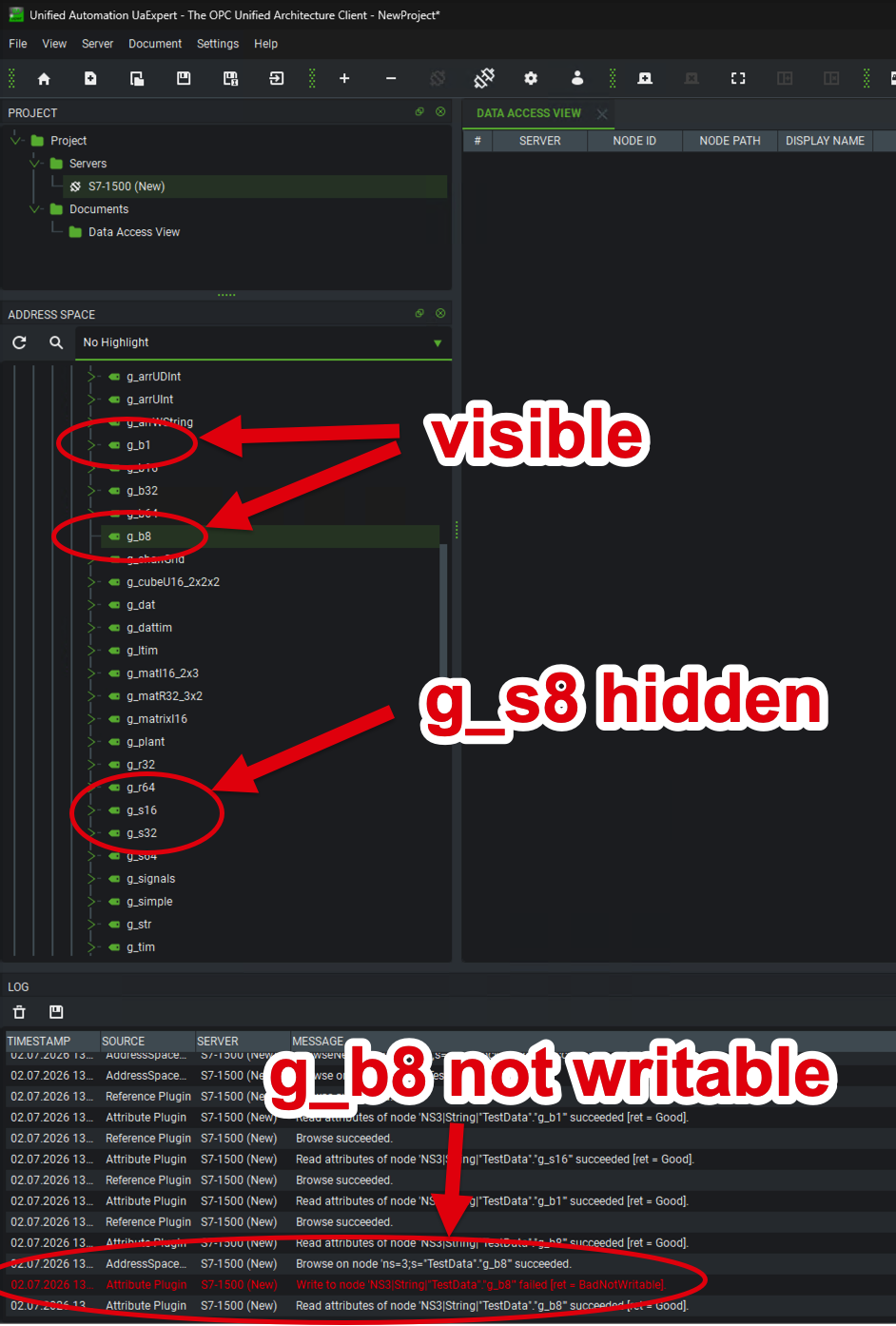
This holds on the S7-1200 G2 too: I enabled its OPC UA server and checked with UaExpert — Accessible and Writable behave exactly as here.
The Web API. The third name on the label was, for a long time, the one I could not measure. The checkboxes say "…from HMI/OPC UA/Web API", and only the OPC UA half of that had been on my bench; the rest rested on Siemens' documentation and on the reasonable assumption that two servers sharing a label share an implementation. Closing that gap meant writing a client, so I built a Web API driver for ToddySoft Connect.[1] The assumption held on both attributes:
A tag marked not accessible cannot be read at all — the controller answers as though the address did not exist (
200 "Address does not exist"), which is the JSON-RPC equivalent of OPC UA omitting it from the address space. The tag is in the program and the native channel reads it happily; this door denies that it is there.A tag marked not writable reads fine and refuses the write, with JSON-RPC error
205 "Address is read-only". On the same connection, in the same run,"TestData".g_b1— all three attributes on — writes successfully.
Why the permissions on the connecting account matter here. A write can fail on this door for two quite different reasons — because the account is not permitted to write anything, or because the variable is not permitted to be written — and separating those two is the whole point of the second experiment. The account it ran under held all 18 Web API rights the controller reports, write_value among them, so there was no further right left to grant. The refusal therefore cannot be an account permission: it is the controller applying that one variable’s own attribute at the API boundary. (Both gates are real, and a write has to pass each of them — the account side gets its own treatment further down.)
The API is consistent about it in the other direction too: PlcProgram.Browse returns a per-variable read_only flag, so a client can see the attribute before it attempts the write rather than discovering it in an error.
Both doors, tested separately, behave the same way. The two tests have almost nothing in common technically. Different protocol, different client, and completely different ways of saying no: OPC UA leaves the not-accessible tag out of its address space and answers a write to the not-writable one with Bad_NotWritable, while the Web API reports that the address does not exist and answers the write with 205. Same two tags, same CPU, same outcome each time.
That is worth a sentence because it rules something out. If only one of the two had enforced the attributes, the obvious explanation would be an implementation detail of that particular server. Two servers, built separately and speaking unrelated protocols, agreeing on the same two tags is what you would expect if the behavior comes from the attributes themselves — which is also what Siemens' documentation says they are for. So for the rest of this article I treat the two as one answer rather than repeating both.
It also changes the shape of the comparison. This is not one door enforcing the attributes while another might; it is two doors enforcing them and one ignoring them. The G2 demonstrates the whole thing on a single device: the same two checkboxes are enforced on both of its standards-based doors and ignored on its native S7CommPlus channel (shown below). One CPU, one pair of attributes, opposite outcomes depending only on which door you knock at.
A second, independent control on the same door — and this one is per account, not per tag. Everything above is about an attribute attached to a variable, which applies to whoever connects. The web server also has a rights model attached to the user, and it is considerably finer-grained than the one word "webserver" suggests.
into Variablen lesen (read variables) and Variablen schreiben (write variables) as separate, independently tickable rights — as do the watch tables, the file browser, and the CPU-maintenance group beside them. image::tia-webserver-access-rights.png[The TIA web server access-rights tree, showing read and write as separate permissions,role=text-center]
The consequence is worth stating plainly, because it is the one place in this whole article where a Siemens control does more than you would expect rather than less: you can create an account that holds Variablen lesen (read variables) and not Variablen schreiben (write variables), and then every write from that account fails, on every tag, regardless of how the per-tag attributes are set. The tag attribute and the account right are independent gates, and a write has to pass both.
That is a genuinely useful property. The per-tag attributes are a statement about a variable and are set at engineering time by whoever writes the program; the account rights are a statement about a client and can be handed out per integration. If a SCADA system, a dashboard, or a reporting tool has no business writing, this is the control that says so once rather than tag by tag — and it does not depend on anybody having remembered to tick Writable on every member of every block.
The comparison with the neighbouring door is unflattering, and the role editor makes it visible at a glance: in TIA’s user management the only OPC UA right I was able to assign was OPC UA-Server-Zugriff — access to the server, as a single switch.
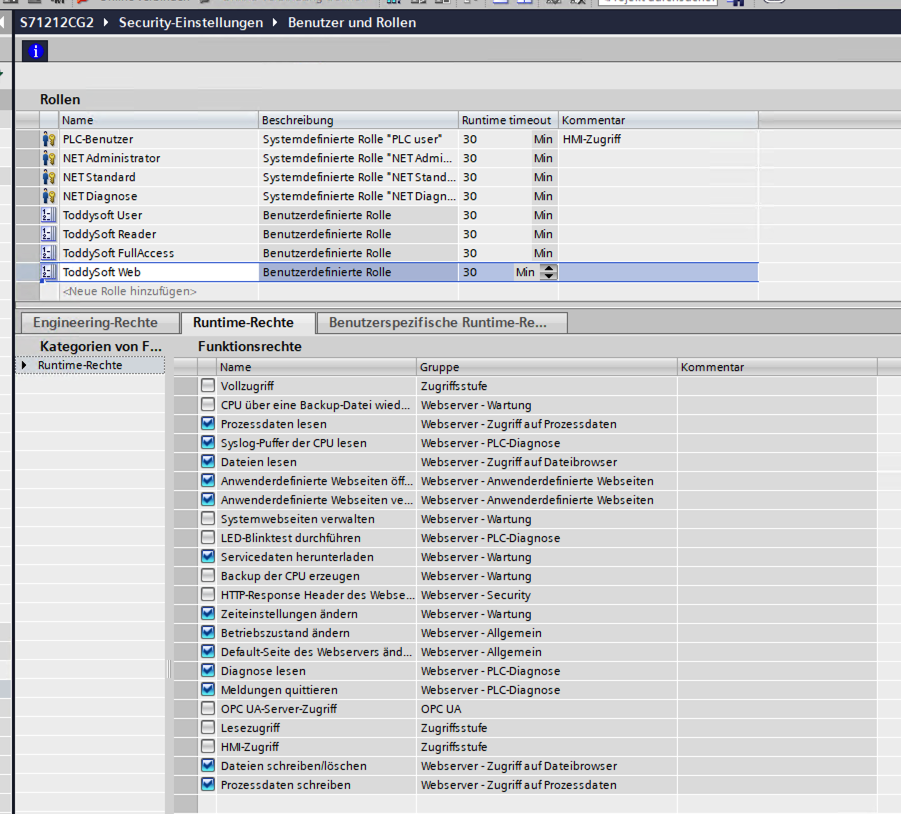
There is no read-only variant of it to hand out, so for OPC UA the per-tag Writable attribute really is the whole of the write control, while on the Web API it is the second of two.[2]
All of the above presupposes a controller that has a Web API, which is a firmware question with a real answer: S7-1500 from V2.9, S7-1200 from V4.5, the G2 from its first firmware, and never on an S7-300 or S7-400. Below the floor the endpoint returns HTTP |
3. What "Visible in HMI Engineering" does: hides tags inside TIA
This is the third column, and it is the one that finally explains the "…from HMI…" wording. Visible in HMI Engineering has nothing to do with the controller or the runtime. It is a filter in the TIA engineering tool: when you engineer an HMI in the same TIA project and go to bind a screen element to a PLC tag, the tags marked not-visible simply do not appear in the tag picker.
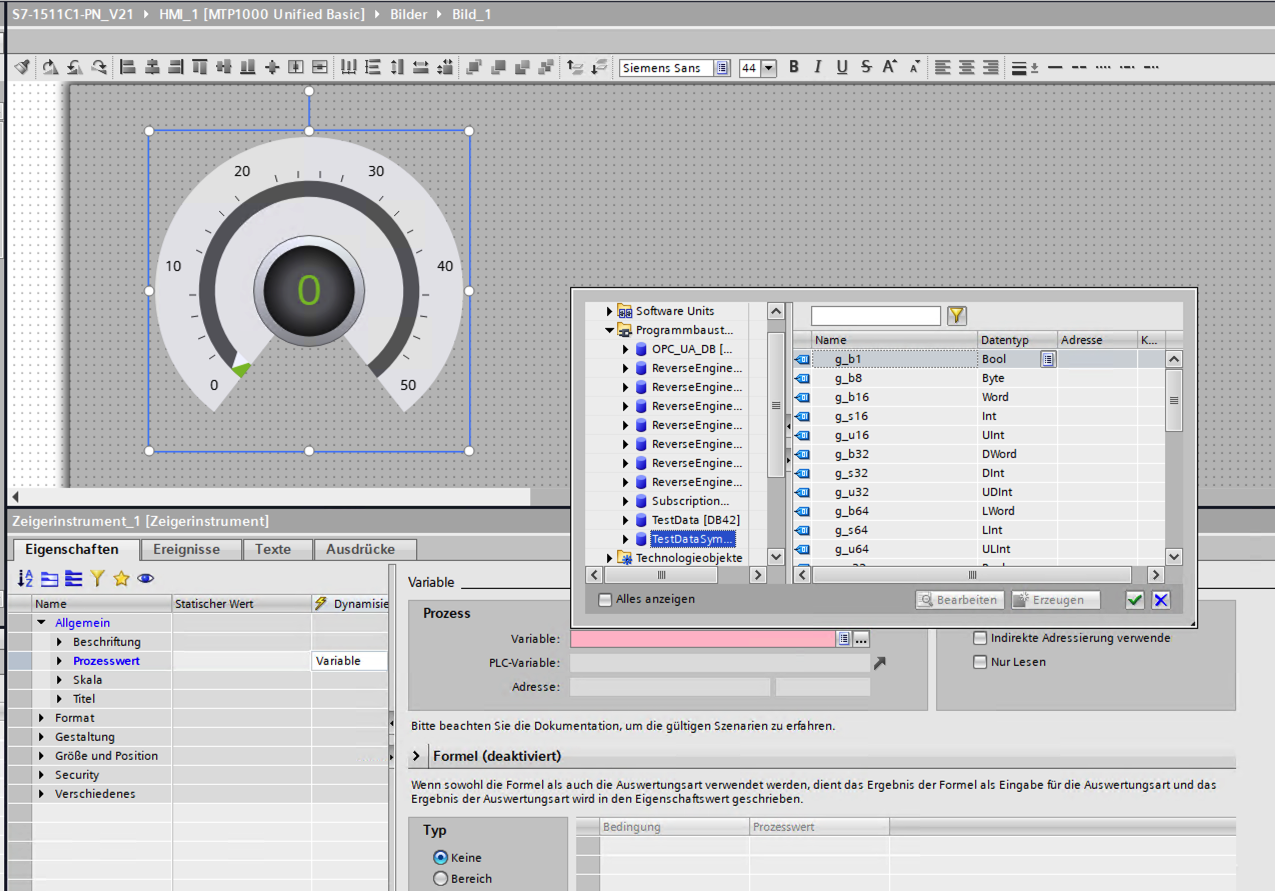
g_s8 and g_u8 are missing from the browser — TIA hides them at engineering time.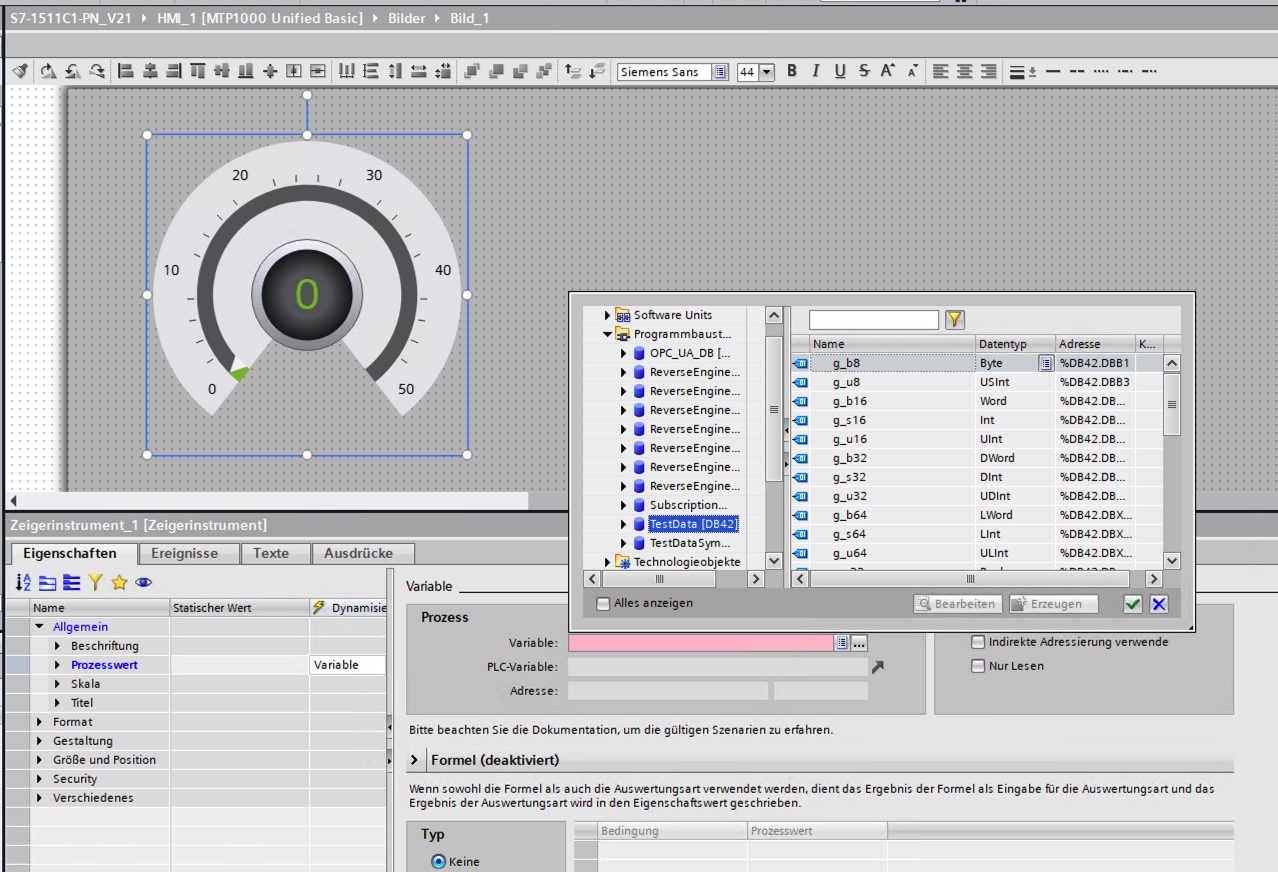
That is the whole mechanism: TIA won’t offer you the tag while you draw the HMI. It does not stop anyone — including a SIMATIC HMI panel at runtime, or any other S7CommPlus client — from addressing that same tag directly. This is a pure tool-enforced convention.
4. What S7CommPlus does: ignores all three
On the native channel none of the three attributes has any effect. Using our own S7CommPlus driver (ToddySoft Connect), every tag — including the not-accessible, not-writable, and not-visible ones — is browsable, readable, and writable, with writes taking effect on the PLC. The controller even reports the attribute values correctly in its type metadata (hmi-visible, hmi-accessible, hmi-writable below); it simply does not act on them when serving GetVariables / SetVariables.
This is consistent across device generations and across both authentication models. I saw the identical result on the classic S7-1500 / S7-1200 (anonymous-password protection) and on the S7-1200 G2 authenticated as a named user with a role (the newer user-management model that replaces the classic protection levels on that generation): the same tags marked not accessible / not visible browse and read, and the same not writable tags write. Requiring a login changes who gets onto the native channel; it does not make the per-tag attributes enforced once they are on it.

g_u8 is returned with hmi-accessible: "false" / hmi-visible: "false" — yet it is fully browsable over the native channel.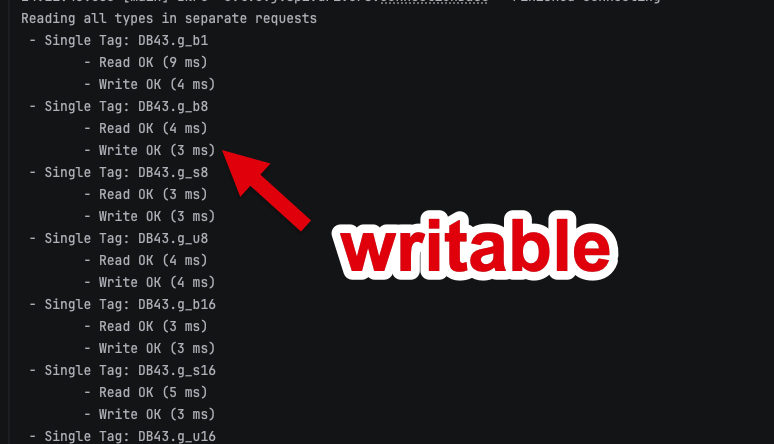
g_b8, which is marked not writable.
TestData, DB42): the not-accessible / not-visible members are returned and fully browsable over S7CommPlus, identical to the optimized case.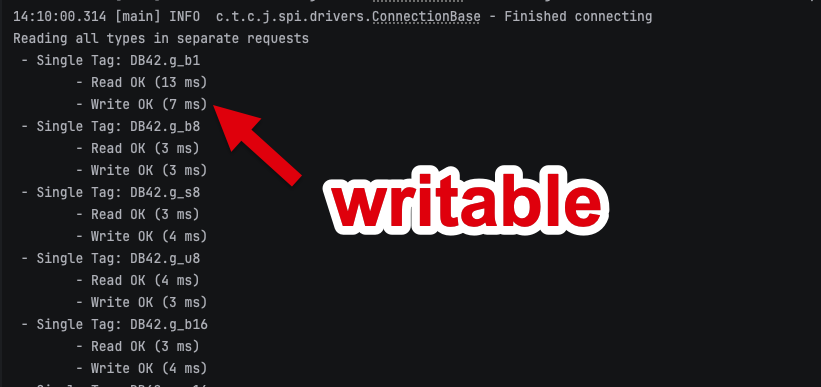
5. And legacy S7Comm ignores them too
For completeness, the older protocol behaves the same way — which is worth a sentence because it is the one case where the answer is genuinely unsurprising. On a classic (non-optimized) DB, which is the only kind legacy 0x32 can address at all, I put the not-accessible / not-writable / not-visible attributes on the members and then read and wrote every one of them over PUT/GET. None of the three had any effect. That is exactly what you would expect: these attributes are scoped to the OPC UA / Web surfaces, and legacy S7Comm is none of those — it is an absolute-addressing protocol that reaches into the block’s memory layout and has no concept of a tag’s metadata in the first place.
And there is a sharper way to put it, because on this door the per-tag attributes are close to beside the point. S7CommPlus at least has an authentication step — a challenge and response, and on the newest generation named users with roles. Legacy S7Comm has nothing of the kind: no login, no credential, no notion of who is calling. Siemens says so in the dialog that enables it, warning that the CPU then "does not have the option of controlling communication with the clients" and that "each device has read and write access to the CPU data without having to configure or program a communication connection."
So on a CPU with PUT/GET enabled, asking which per-tag attributes protect a classic DB is asking the wrong question. Anyone who can reach port 102 can read and write those blocks, attributes, or no attributes — and unlike the modern protocol, there is not even a password to relay. Two things keep that in proportion. It reaches classic blocks only, so an optimized-DB project is out of its range entirely. And modern controllers ship with PUT/GET off, taking two deliberate acts past two warnings to enable — on an S7-1200 G2 it is additionally tied to the anonymous user’s role rather than sitting outside the permission model, although as Read Access Doesn’t Mean Read-Only measures, even that model’s lowest role carries read and write on runtime tags — so the practical result is much the same once the door is open.
And this door cannot be opened on its own. The "it only reaches classic blocks" consolation above is real but much narrower than it looks, because of what has to be true of the CPU before PUT/GET can be enabled at all.
On the classic four-level model, the one level that actually credential-gates native tag access is Complete protection — and that level forces PUT/GET off. So a CPU serving legacy S7Comm is, necessarily, a CPU at one of the levels where native access needs no credential. On the S7-1200 G2 the newer user-management model reaches the same place by a different route: ticking PUT/GET requires the anonymous user to be enabled first, so the legacy door exists only where a no-credential identity does.
Two mechanisms, one consequence: if legacy S7Comm is answering, the CPU is also answering S7CommPlus to a client that presented no credentials. That is not an inference from the dialogs — on the G2 it was measured directly, an anonymous client with no password reading and writing runtime tags, in the same configuration that had PUT/GET enabled.
Which is what breaks the consolation. Legacy S7Comm reaches classic blocks only, but the precondition for having it reaches everything: the modern protocol addresses the symbolic, optimized tags too, and — as the previous section established — honours none of the per-tag attributes while doing so. The exposure created by ticking that checkbox is therefore not bounded by what the legacy protocol can address. It is bounded by what an unauthenticated S7CommPlus client can address, which is the whole symbolic program.
There is no setting that separates the two. The CPU offers no way to say "permit legacy S7Comm without authentication, but require authentication for S7CommPlus". The authentication posture is a property of the controller, not of the protocol you arrive on, and PUT/GET can only be enabled while that posture is permissive. So the real cost of enabling PUT/GET is not the legacy protocol’s modest reach — it is the authentication posture that enabling it requires, which the modern protocol then inherits. If a legacy client genuinely needs PUT/GET, the boundary that does the work is the network, not the CPU: reach that controller from a restricted segment and treat everything on it as open to anything that gets there. |
The one-line version: if legacy S7Comm is enabled, the per-tag attributes are the least of what is not protecting your data — and not only the classic blocks it can reach itself. Three Doors into the Same Controller has the full treatment of that door.
6. Putting it together
| Attribute | OPC UA / Web API | TIA HMI engineering | S7CommPlus (native / HMI panel) |
|---|---|---|---|
Accessible = OFF | enforced — absent from the OPC UA address space; | (n/a) | ignored — browsable + readable |
Writable = OFF | enforced — | (n/a) | ignored — writable |
Visible in HMI Eng. = OFF | (n/a) | enforced — hidden from tag picker | ignored — browsable |
So the "…from HMI/OPC UA/Web API" label spans three different enforcement stories, and the one place the word "HMI" most naturally points — a live HMI panel, which talks S7CommPlus — is the one place nothing is enforced. The only HMI-related effect is the engineering-time visibility filter, which is tool-side and disappears the moment a client addresses the tag directly.
Why the label is a pile-up: these attributes predate OPC UA. They were not invented as an OPC UA access control — that just explains the current wording. The Accessible from HMI flag was born with optimized block access: once the compiler was free to reorganise an optimized DB’s memory layout, classic byte-offset addressing into the block was no longer guaranteed, so Siemens added a symbolic-access flag to let an HMI still reach a tag by name. When OPC UA server support arrived on the S7-1500 (and later the web server gained tag read/write), Siemens reused that same symbolic-access mechanism rather than inventing a new one — so the checkbox was simply relabelled …from HMI/OPC UA, then …from HMI/OPC UA/Web API, as each new consumer was plugged into it. The granularity grew the same way: what began as a single coarse "accessible from HMI" toggle was later decomposed into the separate Accessible / Writable / Visible in HMI Engineering attributes you see today. [3] That origin is exactly why the native S7CommPlus / HMI-panel channel ignores all three: the flags were only ever about which layered consumers — the OPC UA server, the Web API, the HMI-engineering tag browser — get to see a symbolic tag. They were never a gate on the native channel underneath, which already is the HMI data path and serves its tags freely. |
I reported the runtime bypass to Siemens ProductCERT. The outcome — and the crucial thing for you as an operator — is that per the Siemens documentation for local-tag/constant properties, these attributes are defined to apply to the OPC UA / Web API / GUI (engineering) surface, not to the native HMI (S7CommPlus) channel. [4] In other words the behavior is as designed for those attributes — the gap is that the label says "…from HMI/OPC UA," while SIMATIC HMI panels reach the controller over S7CommPlus, which the attributes do not govern. Siemens confirmed the same reasoning applies to both the Accessible and Writable attributes.
Siemens' position is that every version and product is affected, and that this is a documentation issue rather than a vulnerability — so there is no CVE, and what ships is a clarification of the documentation, published as Siemens Security Bulletin SSB-091449, rather than a fix to change. That is a coherent position given the paragraph above: if the attributes are defined to apply to the OPC UA / Web API / engineering surface, then a controller that does not enforce them on the native channel is behaving to specification, and what misleads is the label. It is also why this article argues about the label rather than about a broken control.
I verified the behavior is not specific to one CPU, firmware, block-access mode, or authentication model — it reproduces identically across the range I had on the bench:
| Device | Firmware | Article (MLFB) | Authentication model |
|---|---|---|---|
S7-1500 | V2.9.7 |
| Classic anonymous-password protection |
S7-1200 | V4.6 |
| Classic anonymous-password protection |
S7-1200 G2 | V4.1.2 |
| User management — authenticated as a named user with a role |
On every one of these, a tag marked not accessible / not visible browses and reads over S7CommPlus, and a tag marked not writable still writes — on both optimized and classic DBs. The G2 row is the important one: it shows the newer user-management authentication model does not make these attributes enforced. Logging in changes who reaches the native channel; it does not change what the channel enforces once you are on it.
Do not rely on the per-tag Accessible / Writable / Visible attributes as a defense against native-channel access. Accessible and Writable restrict OPC UA and the Web API only; Visible in HMI Engineering only hides a tag inside the TIA tool. Against a client on either native protocol — S7CommPlus, which includes any SIMATIC HMI panel, and legacy S7Comm on the classic DBs it can address — a "not writable" tag is still writable and a "not accessible" / "not visible" tag is still browsable and readable. |
7. Where to go next
The other articles in this series:
Three Doors into the Same Controller: How an S7 PLC Actually Talks — the protocol map underneath everything above: why the native channel is two unrelated protocols sharing one port, where OPC UA and the web server sit, and which of them carry transport security at all.
Encrypted, but Not Authenticated: TLS on the S7 PG/HMI Channel — the native channel can be encrypted, but it never authenticates the client. A relevant companion to this one: the attributes do not constrain what a client may touch, and the TLS layer does not constrain which client it is.
Security That Lives in the Tool, Not the PLC — why so many S7 protections turned out to live in the engineering tool rather than the device, and why the finding above is an instance of a much older design decision rather than an isolated bug.
8. About
ToddySoft Connect is an industrial connectivity library: a set of protocol drivers that let applications read, write, browse and subscribe to data on automation hardware. Everything measured in this series was measured with it — the S7 driver first, and later the S7 Web API driver, which began as a way to verify a single claim in these articles and turned into a second Siemens driver in its own right. The bench behind the numbers is real hardware: S7-1500, S7-1200 and S7-1200 G2 controllers, plus an S7-300 for the cases where the answer is "that generation does not do this at all".
Christofer Dutz has spent more than a decade on industrial protocols and IT/OT integration, much of it in open source. Questions, corrections and war stories are welcome — particularly corrections: several findings in this series were sharpened by people who knew more about a corner of it than he did.
On the writing: this series took shape over about seven weeks and was restructured, split and rewritten far more often than anyone would manage by hand — what began as one article ended up as six. An AI assistant did the heavy lifting on the prose. It decided nothing: every finding, every number and every conclusion here came off the bench first and was checked back against it afterward. Where the text and the hardware disagreed, the hardware won.