· Security · 26 min read
Read Access Doesn't Mean Read-Only: What the S7 Protection Levels Gate
TIA offers four global protection levels that read like the main access control on the controller. Measured on the wire they gate the engineering and block surface — not runtime tag data, which stays readable and writable at every level except the strictest.
TIA Portal offers four global protection levels, presented as a matrix of access rights, and they read like the main access control on the controller. Measured on the wire they gate the engineering and block surface — not runtime tag data, which stays readable and writable at every level except the strictest one. Including the level Siemens calls read access. This article works through what each level actually governs, what the newer named-user model on the S7-1200 G2 changes, and the one thing it still cannot express.
1. Where this fits
This is the settings half of a series on what Siemens' S7 security settings actually enforce. Read Three Doors into the Same Controller first if the phrase "the native channel" is not already familiar — nearly every verdict below is a statement about which door a setting acts on, and that article is the map. Its companions are One Tag, Three Checkboxes, Two Answers, on the per-variable access attributes; Encrypted, but Not Authenticated, on what the TLS layer on the native channel is and is not worth; and Security That Lives in the Tool, Not the PLC, the argument the rest of the series is evidence for.
2. The four levels, and the matrix they are presented in
Verdict — partly real. The three usable levels mostly gate the engineering / block surface; native-channel runtime tag access stays open at every level except Complete protection, which credential-gates rather than seals.
TIA Portal’s CPU properties offer four global protection levels, presented as a matrix of access rights against HMI / read / write / etc:
Full access (no protection)
Read access
HMI access
Complete protection (no access, incl. HMI)
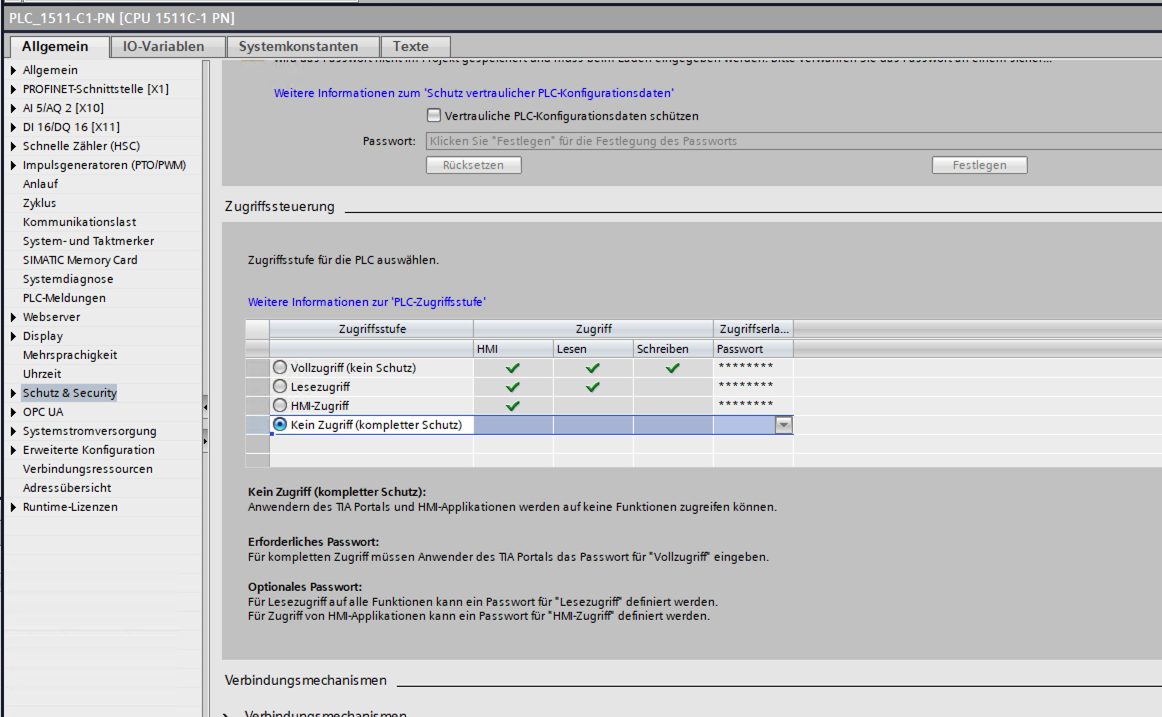
This four-level table is the classic model — and it appears to be on its way out. On the newest firmware with the newest TIA Portal and the new user-management model enabled, this four-level / anonymous-password matrix is disabled (grayed out): access is no longer configured as "pick a level + set passwords" but through named users, roles and permissions instead. So the entire discussion in this section describes the model you will still find on the vast installed base, but on the latest devices it is replaced — not merely supplemented — by the user-management scheme described under "A newer front door" below. Read this section for the classic model; read that one for where Siemens is heading. |
The single most important thing to read off that matrix: the Read and Write columns do not mean "read data" and "write data." They mean reading and writing blocks — program blocks and data blocks — through the engineering tool (upload, download, online access). Runtime tag data access is the separate HMI column, and every level except Complete protection leaves that column ticked. TIA even spells this out for Read access: "HMI applications can access all functions."
That is the framing the matrix is built around, and it is the trap: operators naturally read "Read access" / "Write access" as describing access to runtime tag data, when the columns describe access to blocks/program. The two do not line up:
Read access reads like "clients may read but not write data." It is not. For runtime tag data it still permits unauthenticated HMI-channel writes — an HMI panel has to be able to write setpoints, after all, and that capability is open at this level.
HMI access sounds like the most restrictive of the three usable levels. For tag data it grants effectively the same read+write reach as the ones above.
Complete protection is the only level that restricts unauthenticated runtime tag access over S7CommPlus — but note carefully what it actually does. It does not lock the controller shut; it gates access behind a credential. Supply the configured password (or, on newer CPUs, a login + password), and you get full access back over the very same S7CommPlus channel.
I verified this on the wire (S7-1200, classic model, no password set): at both Read access and HMI access an S7CommPlus client read and wrote every tag; at Full access likewise. Only Complete protection denied anything — and there it denied everything, with every read and write returning ACCESS_DENIED — until the password was supplied, at which point full read/write returned. So the levels behave exactly as the block-vs-HMI split predicts: for the native tag channel, the only one that changes anything is Complete protection, and even that is a credential gate, not a lock. And note what that credential is worth on the wire: Encrypted, but Not Authenticated shows how readily the authentication exchange can be relayed by someone sitting between client and CPU.
That is the runtime-tag half. The block half — the surface the Read and Write columns are really about — I checked on the wire as well, on the S7-1500. The question was whether those two columns are enforced by the controller or only by the engineering tool, and I tested the read direction: uploading a program block out of the CPU, which does nothing to the running plant. There the label holds up — Read access genuinely is the gate. Below it, an upload comes back with the block’s shape but not its compiled body — the controller hands over the structure and withholds the logic — and only at Read access and above does the whole block cross the wire. The write direction — downloading a modified program back in — I left alone on purpose: a bad download can take out lab hardware, and there was no need to run it. If the controller withholds a program when it is pulled out, there is no reason it would surrender control when one is pushed back in — and Siemens says the download path is PLC-enforced as well, which is enough to rest the write column on. So the columns are not misnamed; they describe blocks, not data. The same word — read — that does nothing to restrict a live tag genuinely restricts program extraction: the sharpest case in the whole matrix of the trap this section is about, an accurate label attached to a surface most operators are not picturing when they read it.
So if you need to restrict unauthenticated read/write of live tag data on the native channel, the lever is Complete protection plus authentication — not "Read access". What that buys is examined below, and it is less than the name suggests.
3. A word on the passwords (this took me a while to get)
The password column in that matrix confused me for quite a while, so it is worth spelling out. The rule is: pick a baseline level, and every level above it gets its own password field (all except that of full access being optional).
Work through an example. Set the baseline to Complete protection, and TIA shows password fields for the three levels above it — HMI access, Read access and Full access. The baseline itself is what a client gets with no password; each higher level is unlocked by presenting that level’s password. So you can hand out graded credentials: a Complete protection baseline with a password on HMI access and a different password on Full access means a client must present one of the two to talk to the CPU at all — the HMI-access password is enough to connect over S7CommPlus (tag access), while the Full-access password is required to actually update the program.
The graded model looks much flatter from the wire — and this is the most important thing in this section. In TIA the three password fields present a clean hierarchy: a lesser credential buys you less. What the controller actually holds is a small set of configured secrets — up to three — and the legitimation exchange comes down to "does the secret this client presented match one of them?" The matched entry is what decides the level you are granted. The consequence is the part to take away: any one of those passwords is enough to get onto the native channel, and once you are on the native channel you have complete read/write access to the tag data. There is no finer gradation down there — the CPU has no notion of "this client may read tags but not write them." The HMI-access password, the one you might hand out most freely because it sounds like the least privileged of the three, opens exactly the same runtime tag surface as the Full-access password does. The levels differ in what they grant on the block / engineering surface, not in what they grant over S7CommPlus. So treat every password in that dialog as equally sensitive: the weakest one you configure is the real strength of the CPU’s runtime protection. (I have not exhaustively reverse-engineered the level-selection logic inside the firmware, so read the mechanism description as an accurate working model; the operator-facing consequence — any valid password yields full native-channel tag access — is bench-observed.) |
Why are all these fields optional except, in practice, the top one? Because the moment you choose anything other than Full access, the device’s blocks become write-protected. Without a Full access password there would be no credential that re-grants download/upload rights — and TIA could then no longer change the program on the CPU, effectively bricking it for maintenance. That is why, once you leave Full access, TIA effectively insists you set a Full access password: it is the escape hatch that keeps the controller maintainable. The intermediate passwords (HMI access, Read access) are genuinely optional — set them only if you want to require a credential for those lighter levels too.
Which closes the loop on the whole arrangement. A Full access password essentially always has to exist, or the CPU cannot be maintained; presenting it grants full read and write on every tag. The device-side controls are therefore credential-gated rather than sealed — the standard defense-in-depth model for industrial controllers, in which the network boundary carries the outermost layer.
Current industry standards consider the network boundary as the outermost layer of protection for an S7 device. No combination of protection level, per-tag attribute, or know-how protection can make a reachable CPU truly inaccessible on its native channel — the best they do is gate access behind a credential that, by design, must exist. If you genuinely need to stop someone from reaching the controller, you have to stop the packets from reaching it: put the CPU behind a firewall, block TCP/102 from anywhere that has no business talking to it, and segment the control network. Everything the CPU itself offers is a secondary, defense-in-depth layer behind that boundary — never a substitute for it. |
4. The same matrix, wearing different clothes
Everything above describes the classic protection model, and it is still what you will find on most CPUs in the field. On the newest firmware, paired with a recent TIA Portal, Siemens has introduced a user-management scheme that replaces it: named users, assigned roles, and each role carrying a set of function rights. When user management is in effect the four-level table above is grayed out — this is its successor, not an addition beside it.
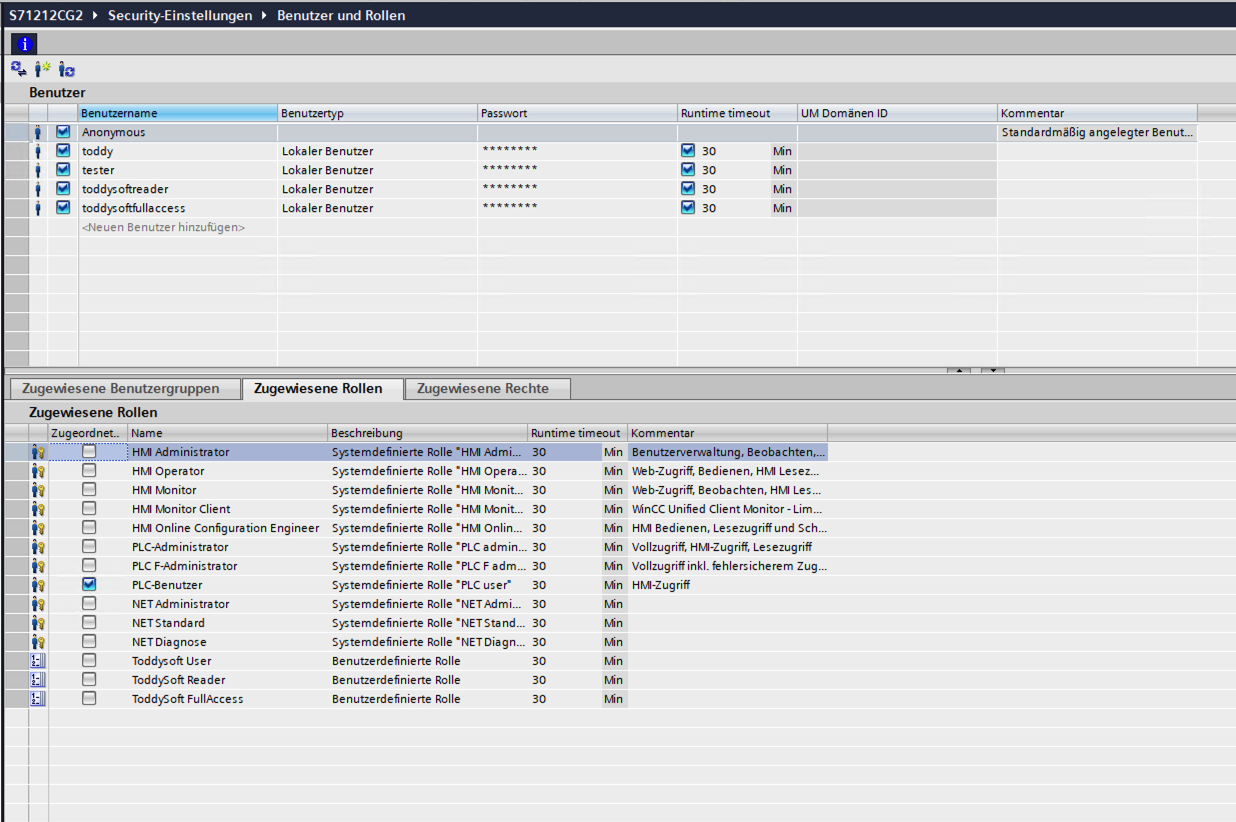
It is tempting to read that as a new access-control model, and for the web server and OPC UA it partly is. For the native channel it is the old matrix with a different login on the front of it. The three rights a role can carry that affect S7CommPlus are HMI-Zugriff, Lesezugriff and Vollzugriff — HMI access, read access and full access, the same three the classic table was built from, in the same nesting. Inspect the stock PLC-Administrator role and its PLC permissions are exactly that triple; PLC-Benutzer (PLC user) carries the bottom one alone. Every other stock role — all the NET roles, and the HMI roles, which are about WinCC/HMI engineering rather than the HMI-Zugriff permission — has no effect on the native channel at all.
So the honest summary of the change, from the native channel’s point of view, is two things:
Unlocking a level now takes a username and a password. In the classic model the client is anonymous: it presents a secret, and which secret it presents selects the level. On a user-managed CPU it presents a login, and the controller resolves that to a user, a role, and the role’s rights. This is the real gain, and it is worth having — access becomes attributable to a person rather than to whoever knew the shared word. (It is also why a driver connecting to an S7-1200 G2 needs a username where older CPUs took a password alone.)
Three places became one. Security settings → Users and roles (Security-Einstellungen → Benutzer und Rollen) is not new; it has been there for a long time, back as far as an S7-300, but it carried only OPC UA rights, and only on devices that had an OPC UA server to grant access to. Web server users were configured somewhere else entirely — under the device’s own Web server → User management (Webserver → Benutzerverwaltung), with their own fine-grained per-user permissions. The protection levels and their passwords lived in a third place again, under Protection & Security → Access control (Schutz & Security → Zugriffssteuerung). On a user-managed CPU all three have been folded into Users and roles: one place to define who exists, what they know, and what they are allowed to do.
What did not change is the set of rights, their nesting, or what the bottom rung permits. That matters, because "we moved to named users and roles" is exactly the kind of upgrade that invites the assumption that older findings no longer apply. They do — and not only these. The per-tag attributes, the subject of One Tag, Three Checkboxes, Two Answers, are untouched by this model too: on a G2, authenticated as a named user with a role, tags marked not accessible still browse and read, and tags marked not writable still write. A better front door; the same rooms behind it.
The rest of this section is the measurement that establishes it, because the mapping above is worth more than an inspection of role definitions.
I probed the mapping with our own S7 driver — ToddySoft Connect — by building three user-defined roles carrying a single access right each — one with only HMI-Zugriff, one with only Lesezugriff, one with only Vollzugriff — and connecting our driver as users holding them, plus a fourth run with no credentials at all. All four ran back-to-back against one unchanged CPU configuration, over TLS-wrapped S7CommPlus with the driver’s protocol floor pinned so that no silent fallback to legacy S7Comm could counterfeit a result.[1] Each connection ran to a real tag: read it, wrote a different value, read it back to confirm the write had actually landed rather than merely being acknowledged.
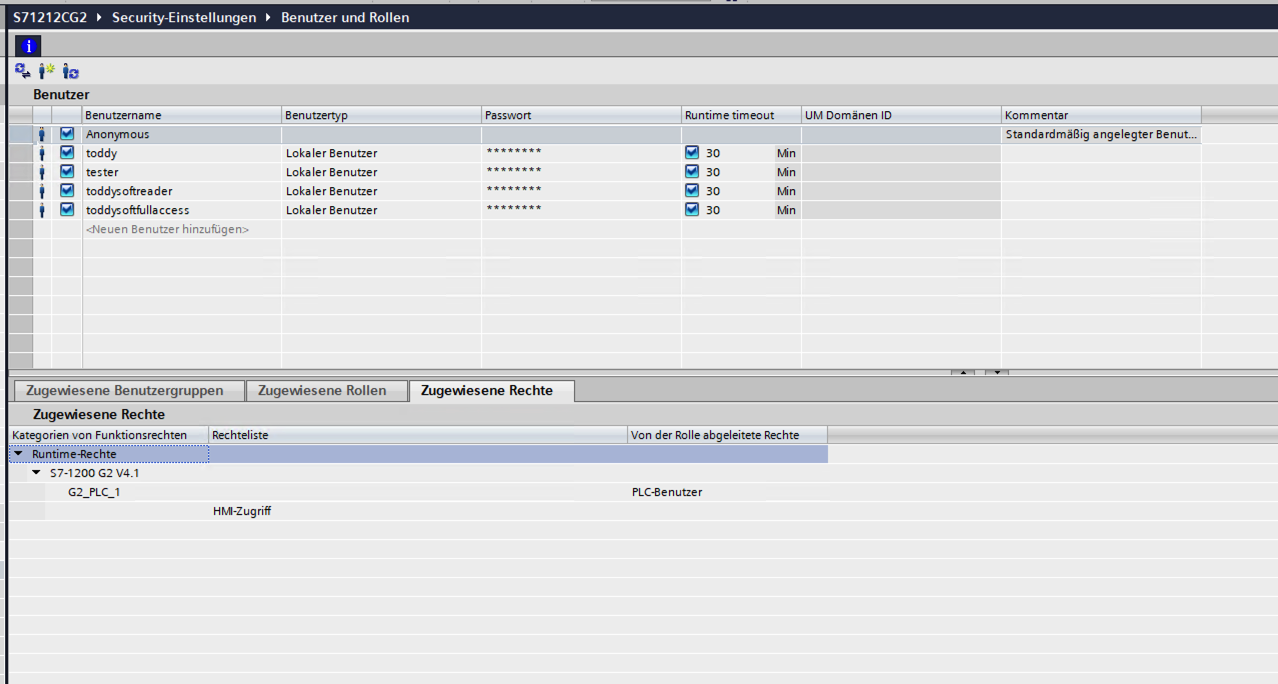
One piece of the CPU-side configuration has to be stated for the fourth row to be interpretable, because without it the row invites the wrong reading. The anonymous user was activated on this CPU, and it held the stock PLC-Benutzer role, whose only runtime function right is HMI-Zugriff — the screenshot further down shows exactly that derived right and nothing beside it. So the credential-less client was not talking to a device that had been left unconfigured; it was talking to the anonymous identity that a G2 makes you switch on deliberately, past a warning, carrying precisely one access right. That it was granted HMIAccess is therefore not a surprise and is not the finding. What it was then permitted to do with that level is.
| Role (single right) | Level the CPU granted | Read | Write | Value actually changed |
|---|---|---|---|---|
only HMI-Zugriff |
| yes | yes | yes |
only Lesezugriff |
| yes | yes | yes |
only Vollzugriff |
| yes | yes | yes |
no credentials |
| yes | yes | yes |
Two things fall out of that table, and the second is the one that matters.
First, the controller is not sloppy about the levels. Each role produced its own granted access level, faithfully and distinctly — HMIAccess, ReadAccess, FullAccess, logged by the CPU itself at connect. Whatever else is going on, the device is not collapsing the three rights into one.
Second — and this is the finding — every one of those levels permits writing. The account holding nothing but Lesezugriff, to which the controller itself assigned the level it calls ReadAccess, wrote a new value into a data block and the readback confirmed the change. So did the account with only HMI-Zugriff, the lowest rung of the three. So did an anonymous client presenting no credentials whatsoever.
Reading and writing known addresses was not the limit of it. Asked to browse rather than to touch an address it already knew, that same credential-less connection enumerated the controller’s whole symbolic tag space — every variable of every data block, under the names the engineer gave them — a result I have reproduced on the bench repeatedly. So the anonymous client does not merely reach the values; it is handed the map of what they are.
The nesting is therefore real but its consequence runs the opposite way from the reassuring reading. It is not that the higher levels quietly drag the lower ones along; it is that the lowest rung already carries full read and write access to runtime tag data, so the two rungs above it add nothing on this surface. Writing a tag is an HMI-class capability, and HMI-Zugriff sits underneath Lesezugriff in Siemens' own ordering — so a level named "read access" cannot restrict writing, because the thing it contains already permits it.
Which makes Lesezugriff a misnomer on this channel. It reads as the safe, observation-only grade — the one you would hand to a dashboard, a historian, a contractor’s diagnostic tool — and on the native channel it is nothing of the sort. Whatever the three levels distinguish between, it is not reading versus writing process data.
Follow that nesting to its conclusion, because it is the whole point. If every level from HMI-Zugriff upward carries write access to runtime tags, then there is no way to express "this account may download blocks but may not read or write runtime tag data." The permission an engineer needs to do their job necessarily carries native-channel tag access with it. Every credential capable of engineering work is also a credential that can browse, read and write every tag the program exposes — not as an oversight in some deployment, but as a property of the permission model. That is worth sitting with, because the named-user model is the newest access-control surface Siemens offers on these CPUs, and it is the one an operator would reasonably expect to deliver least-privilege. On the axis that matters most for the native channel, it does not: it re-expresses the same coupling of engineering rights to runtime data access that the four-level table had, just with names and roles attached. The improvement is in accountability — who logged in, traceable per user — not in separation. |
5. One device, three different ideas of granularity
The full function-right catalog is worth looking at as a whole, because the Gruppe column sorts every permission the CPU knows into families — and the families are wildly uneven.
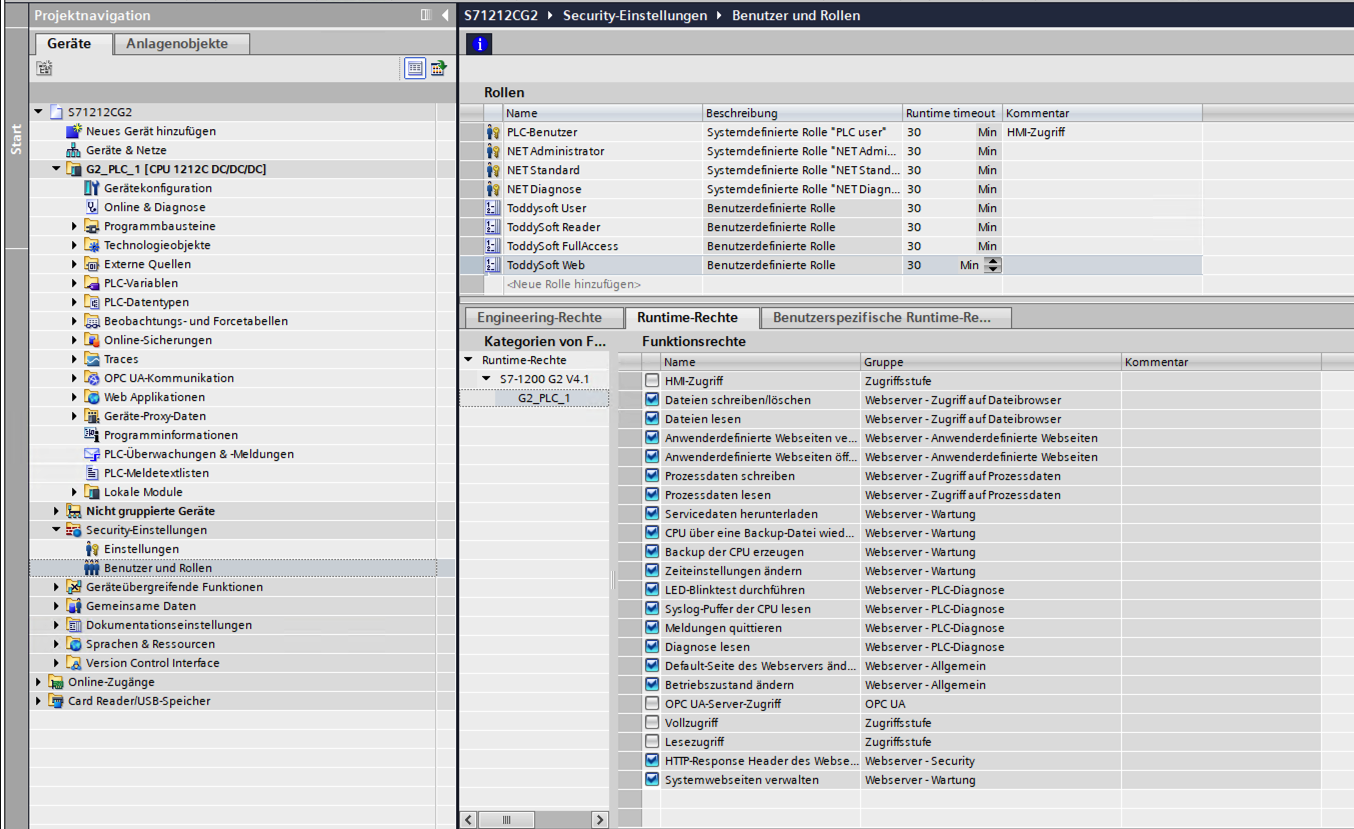
Three surfaces on one controller, three completely different granularity models. The web server gets fine-grained, orthogonal rights; OPC UA gets a single binary switch; the native channel gets a three-rung cumulative ladder.
That unevenness has a history, and it is the consolidation described earlier showing through. Those three groups are the three dialogs this list was assembled from. The web server rights came from the device’s own Web server → User management, where per-user permissions had always been fine-grained. The lone OPC UA entry came from Users and roles itself, where for years it was the only thing on offer. And the three Zugriffsstufe (access level) entries are the classic protection matrix, flattened from levels into permissions. Merging three dialogs into one list does not merge the thinking behind them — it puts them side by side, at the same indentation, where you can finally see them disagree about how finely access to a controller ought to be described.
And one pair of entries in that list is the argument of this whole article in miniature. Under Webserver - Zugriff auf Prozessdaten (web server, access to process data) there are two separate rights: Prozessdaten lesen and Prozessdaten schreiben — read process data and write process data. Reading process data and writing process data are distinct, independently grantable permissions — on the web surface. On the native S7 channel that distinction does not exist: as this article has shown, Lesezugriff — the level Siemens labels "read access" — still permits HMI-level tag writes, because writing a tag is an HMI-access capability and HMI access sits underneath read access in the nesting.
So this is not a case of a vendor who never considered separating read from write on process data. The capability is right there in the same permission model, applied to the same controller, for a different protocol. It simply was not applied to the channel that most process data actually travels over.
Supporting a user-managed CPU (S7-1200 G2 and newer): to use an S7CommPlus/HMI client (including our driver) the account needs one of the three Zugriffsstufe (access level) rights — HMI-Zugriff, Lesezugriff or Vollzugriff. The minimum is HMI-Zugriff, i.e. a user in the PLC-Benutzer role (or PLC F-Administrator / PLC-Administrator) is enough; but all three connect: bench-measured 2026-07-31, a role carrying only Lesezugriff or only Vollzugriff connects just as readily as HMI-Zugriff, and all three can read and write tags. What genuinely does not grant native-channel access is a NET or HMI role. Those concern network functions and WinCC/HMI engineering and carry no PLC access right at all — the client authenticates but the connection then fails (granted native level NoAccess). If a user can log in elsewhere but your S7CommPlus client cannot connect, check that the account’s role carries a Zugriffsstufe right at all. |
6. Where to go next
One Tag, Three Checkboxes, Two Answers is the finding that started the series, and it is the per-variable counterpart to everything above: where this article asks what an account may do, that one asks what a tag permits, and reaches a similar answer about which door the label really refers to.
Security That Lives in the Tool, Not the PLC takes the verdicts here and asks the obvious follow-up question — if so many of these controls turn out to be narrower than they look, is that an accident or a pattern? It also carries Siemens' own word on the block surface — that both upload and download are enforced by the PLC — which is what the read-direction measurement above independently confirms for the half I could safely test.
7. About
ToddySoft Connect is an industrial connectivity library: a set of protocol drivers that let applications read, write, browse and subscribe to data on automation hardware. Everything measured in this series was measured with it — the S7 driver first, and later the S7 Web API driver, which began as a way to verify a single claim in these articles and turned into a second Siemens driver in its own right. The bench behind the numbers is real hardware: S7-1500, S7-1200 and S7-1200 G2 controllers, plus an S7-300 for the cases where the answer is "that generation does not do this at all".
Christofer Dutz has spent more than a decade on industrial protocols and IT/OT integration, much of it in open source. Questions, corrections and war stories are welcome — particularly corrections: several findings in this series were sharpened by people who knew more about a corner of it than he did.
On the writing: this series took shape over about seven weeks and was restructured, split and rewritten far more often than anyone would manage by hand — what began as one article ended up as six. An AI assistant did the heavy lifting on the prose. It decided nothing: every finding, every number and every conclusion here came off the bench first and was checked back against it afterward. Where the text and the hardware disagreed, the hardware won.
min-protocol=v3-tls makes the driver fail rather than downgrade, so every row below is unambiguously the account named in it.