· Security · 57 min read
Three Doors into the Same Controller: How an S7 PLC Actually Talks
A modern S7-1500 or S7-1200 answers on three quite different doors, and they do not enforce access control the same way — or, in some cases, at all. A map of the native S7 channel, the OPC UA server and the web server beside it, and the fieldbus underneath.
Almost every confusion about "S7 security" starts in the same place: assuming a setting applies to the controller, when it actually applies to one channel. A modern S7-1500 or S7-1200 answers on several quite different doors, and they do not enforce access control the same way — or, in some cases, at all. This article maps them: the native S7 channel and the two unrelated protocols sharing it, the OPC UA server and the web server beside it — separate doors, not one "standards-based surface" — and the fieldbus underneath that plays by different rules entirely.
1. Why this matters before any setting does
This is the groundwork piece in a short series on what Siemens' S7 security settings actually enforce. Its companions are Encrypted, but Not Authenticated, on what TLS does and does not buy you on the native channel, and One Tag, Three Checkboxes, Two Answers, on the per-variable access attributes that two of these doors enforce and one ignores, and Security That Lives in the Tool, Not the PLC, the argument the others are evidence for.
Read this one first if you want the verdicts in those articles to land, because nearly all of them are really statements about which door a setting acts on. A checkbox that closes one protocol while leaving its neighbour wide open is not a flaw in the checkbox; it is a consequence of a controller that speaks more protocols than its settings dialog suggests.
The other thing to fix in your head before the settings themselves: a modern S7-1500/1200 talks to the outside world over (at least) three quite different application channels, and they enforce access control differently:
The native S7 channel — reached over ISO-on-TCP (TCP/102) via the COTP TSAP
SIMATIC-ROOT-HMI. This is what SIMATIC HMI panels, WinCC and TIA Portal itself use. It is not one protocol but two — legacy S7Comm and modern S7CommPlus — sharing the same transport but diverging above it (see the deep-dive below).The OPC UA server — TCP/4840, the vendor-neutral door. It secures itself at the message layer with its own UA SecureChannel, and it is the only surface on this controller that can ask a client for an x509 certificate. What third-party SCADA and OPC UA clients use. Alone among the three, it is a separately licensed option, priced per CPU.
The web server — TCP/443, and on every generation but the newest, TCP/80 as well. Three things have lived behind it at different times: the built-in diagnostic pages; user-defined pages, which you can author and put on the CPU yourself; and the Web API, a JSON-RPC interface that reads and writes tags with a named account and a session token. Their history is not the same, and the difference matters. Older firmware served the pages over plain HTTP on 80, with an option to offer them over HTTPS as well; the Web API arrived later, with the TLS-capable firmware, and has only ever answered on 443. On an S7-1200 G2 there is no port 80 at all, so everything the web server offers there is offered over TLS or not at all — user-defined pages included, which that generation still supports.
I wrote this article for a long time as "two doors", folding OPC UA and the Web API together as one standards-based surface. That was a mistake, and an instructive one: they share a label on a checkbox and almost nothing else. Different ports, different transports, different authentication models — certificates on one side, a password and a bearer token on the other — different firmware availability, and, as the companion article on the per-tag attributes shows, different evidence about what each actually enforces. Collapsing them is precisely what let one of those two go unmeasured for as long as it did.
A lot of confusion around "S7 security" comes from assuming a setting applies to the controller when it actually applies to only one channel. Keep the three channels in mind — most of the surprises in this series are about a setting applying to one and not the others.
The whole picture in one image — worth a minute’s study, because nearly every verdict in the companion articles is really a statement about which box a setting acts on:
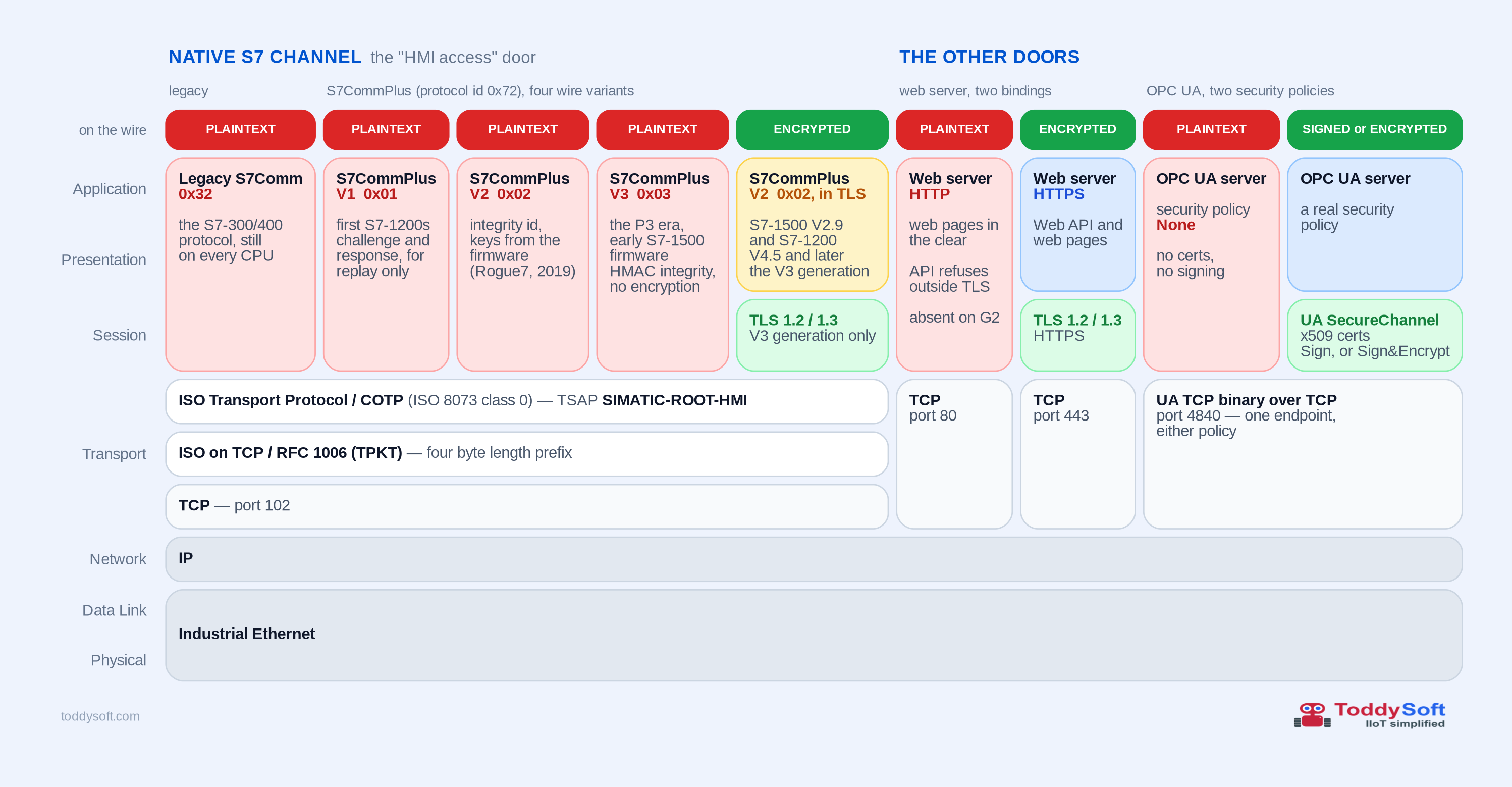
0x32 or 0x72 — nothing below the application layer can tell them apart. A firewall that filters by port cannot either; only one that inspects the payload can. Third, the doors on the right are different stacks, not one "standards-based surface": plain HTTP on 80 has no session layer under it whatsoever — as red as legacy S7Comm. Measured on a classic S7-1200: it serves the web pages in the clear (/ → /Default.mwsl → /Portal/Intro.mwsl, 200 OK, never leaving HTTP) while the JSON-RPC API refuses to operate outside TLS — the identical Api.Ping request that returns 200 OK on 443 comes back 400 BAD REQUEST with an empty body on 80. So the pages and whatever a user types into them travel in the clear; the API’s own credentials do not. It should still be switched off (Permit access only with HTTPS), and on an S7-1200 G2 there is no plain-HTTP binding at all; HTTPS on 443 is the one door actually running TLS; and OPC UA on 4840 uses neither — it secures itself at the message layer with its own UA SecureChannel. Fourth, note that OPC UA appears twice, and that both columns sit on the same transport block: one endpoint on 4840 serves either policy. With a real SecurityPolicy you get the green box — signing, encryption and the x509 certificates that make its trusted-clients list meaningful. Note the band above that column says SIGNED or ENCRYPTED, not simply encrypted, and the distinction is not pedantry: OPC UA’s message-security mode may be SignAndEncrypt or Sign, and a Sign-only policy authenticates the peer and integrity-protects the session while still putting every value on the wire in the clear. That is a third setting with a third outcome — a perfectly valid "secured" OPC UA endpoint whose process data is as readable as the red columns. With SecurityPolicy None, also a selectable endpoint, there is no encryption, no signing and no certificate exchange at all, and OPC UA is exactly as red as the plaintext doors either side of it. It is the best-defended door on this controller only if you configure it to be. (Even the encrypted native column bootstraps with a short plaintext handshake before TLS takes over. PROFINET is deliberately left out; see the note below.)Two details in that picture are worth flagging now, because they do a lot of work later. The x509 client certificates in OPC UA’s UA SecureChannel have no counterpart on the left: the native channel’s TLS layer authenticates the controller to you and never asks the client for a certificate — same CPU, same session layer, one door able to check who is calling and the other not. That is the asymmetry the TLS chapter is built around — and note the word able, because as the red OPC UA column shows, that capability still has to be switched on. And the per-tag attributes that most operators think of as the access control live in the blue boxes only — not in any of the five native-channel columns, which is the single most consequential misreading in this whole area, and the one One Tag, Three Checkboxes, Two Answers sets out to correct.
There is a fourth channel these CPUs speak that this series deliberately leaves aside: PROFINET. It is a different kind of door. PROFINET is how the controller talks downwards — to the sensors, actuators, drives and remote I/O it operates — rather than upwards to HMIs, SCADA and the rest of the business. It typically lives on its own cabled segment, frequently needs real-time-capable network hardware, and in most plants it is simply not reachable from the company intranet in the first place. That does not make it uninteresting from a security point of view — it is arguably the softest surface of all once you are on that segment — but it is a fieldbus story, not a "which TIA checkbox protects my tag data" story, and none of the settings this series works through govern it. Worth keeping on your allow-list all the same, for the sake of completeness.
2. The native channel up close: one transport, two protocols
"HMI access" is a slightly misleading singular. On the wire, the native channel is a stack, and the same lower layers carry two quite different application protocols.
From the bottom up, both protocols ride the same lower layers — up to a point, and the point at which they stop sharing is itself worth noticing:
TCP on port 102.
TPKT (RFC 1006) — a 4-byte length-prefix framing that lets the old ISO transport protocol run over TCP.
COTP / ISO-on-TCP (ISO 8073 class 0) — connection setup carries the source and destination TSAP; the HMI/native surface answers on
SIMATIC-ROOT-HMI.TLS (only for modern S7CommPlus) — on modern firmware a TLS layer sits on top of the transport and the S7CommPlus conversation runs inside it. This is not an S7-1500-only trait: a plain S7-1200 does it too. The rough firmware boundaries are S7-1500 from V2.9 and S7-1200 from V4.5[1] — bench-verified, a classic
6ES7 212-1AE40on firmware V4.6 negotiates TLS 1.3 onSIMATIC-ROOT-HMIexactly like an S7-1500 does. Older firmware of either family speaks S7CommPlus without TLS — in the clear (or, on some S7-1200 V4.3/V4.4, under an older Siemens-proprietary cipher) — so whether the native channel is encrypted depends on the device generation and firmware, not on a setting you toggle. (Legacy S7Comm is always plaintext.)
Up to and including COTP, an HMI panel and a legacy S7Comm client are indistinguishable: same port, same framing, same connection setup. Everything above that is where they part company — and they part company twice. First at the TLS layer, which only S7CommPlus ever gets (a legacy S7Comm conversation on a modern, TLS-capable CPU still runs in the clear, right next to the encrypted one, on the same port). Then at the application layer proper, where the first payload byte — the protocol id, 0x32 or 0x72 — says which of the two you are talking to. Those two protocols are the subjects of the next two sections.
2.1. Legacy S7Comm (0x32)
Legacy S7Comm is the classic protocol from the S7-300/400 era. It is the native protocol on the S7-300 and S7-400, and is still supported by the S7-1200 and S7-1500 for backward compatibility. It also reaches further back than that: users have reported successfully driving S7-200 controllers with the same driver, so in practice the legacy 0x32 surface spans the whole classic family from the S7-200 up through the S7-1500. The one notable change comes with the newest generation: the S7-1200 G2 no longer exposes legacy S7Comm by default. It is not gone, though — Siemens documents that classic PUT/GET access can be re-enabled on the G2 through its configuration,[2] so on the G2 the legacy surface is off until an operator deliberately turns it on rather than removed. Two things matter for security on the platforms that expose it:
It is only reachable when PUT/GET communication is enabled in the CPU properties. (This is the "permit access with PUT/GET" checkbox — and note it gates legacy S7Comm only, not S7CommPlus. See the PUT/GET section.)
It only supports direct / absolute addressing —
DB<n>.DBX<byte>.<bit>and friends. It therefore cannot reach tags in blocks that use Optimized block access, because optimized blocks deliberately hide the absolute memory layout. For an optimized DB, legacy S7Comm simply has no way to name the tag.For the classic (non-optimized) blocks it can reach, it reads and writes them without any further per-tag filtering — but that only becomes interesting once we get to the per-tag attributes, so it is picked up there.
The G2 changes the default, not the availability — and that is the secure choice. On the S7-1200 G2, legacy S7Comm is off out of the box, and re-enabling it is deliberately gated behind the newer user-management model. The gating is not merely a documented sequence, it is enforced in the dialog, and the exact order is worth recording (bench-confirmed 2026-07-30): the "Zugriff über PUT/GET-Kommunikation durch remoten Partner erlauben" checkbox stays grayed out and unclickable until you have (1) enabled the anonymous user and (2) assigned it a role carrying HMI access. Only then does the checkbox become available, and ticking it raises a warning — as does enabling the anonymous user in the first place. Two deliberate acts, each with its own confirmation. That dependency is more interesting than a UI detail, because it tells you how Siemens folded the old protocol into the new model. Legacy S7Comm has no authentication of its own — that is the whole problem with it — so on the G2 it does not get a bypass: it runs as the anonymous user, with that user’s HMI access. Which lands exactly on the equivalence this article keeps returning to. Runtime tag access over the native channel is HMI access; now the legacy door is explicitly wired to the same permission rather than sitting outside the permission model entirely. On earlier controllers PUT/GET was a checkbox that opened an unauthenticated surface; on the G2 it is a checkbox that grants an identity — an anonymous one, but one with a role you chose and can inspect. That default-closed posture is the right one from a security standpoint — the legacy protocol carries no transport security of its own (it is always plaintext, as noted above), so shipping it disabled means a fresh G2 does not answer a legacy client until someone consciously opens that door, twice, past two warnings. And those warnings are unusually candid, so they are worth reading rather than clicking through. Enabling the anonymous user brings up a Security-Hinweis stating that "Wird der anonyme Benutzer aktiviert, ist die Projektsicherheit in dem Maße eingeschränkt, wie Sie diesem Benutzer Rechte zuweisen" — activate the anonymous user and project security is reduced in proportion to the rights you hand it. That is a precise and honest way to put it, and it is the same arithmetic this series applies to every other setting: the exposure equals the rights on the other side of the door. 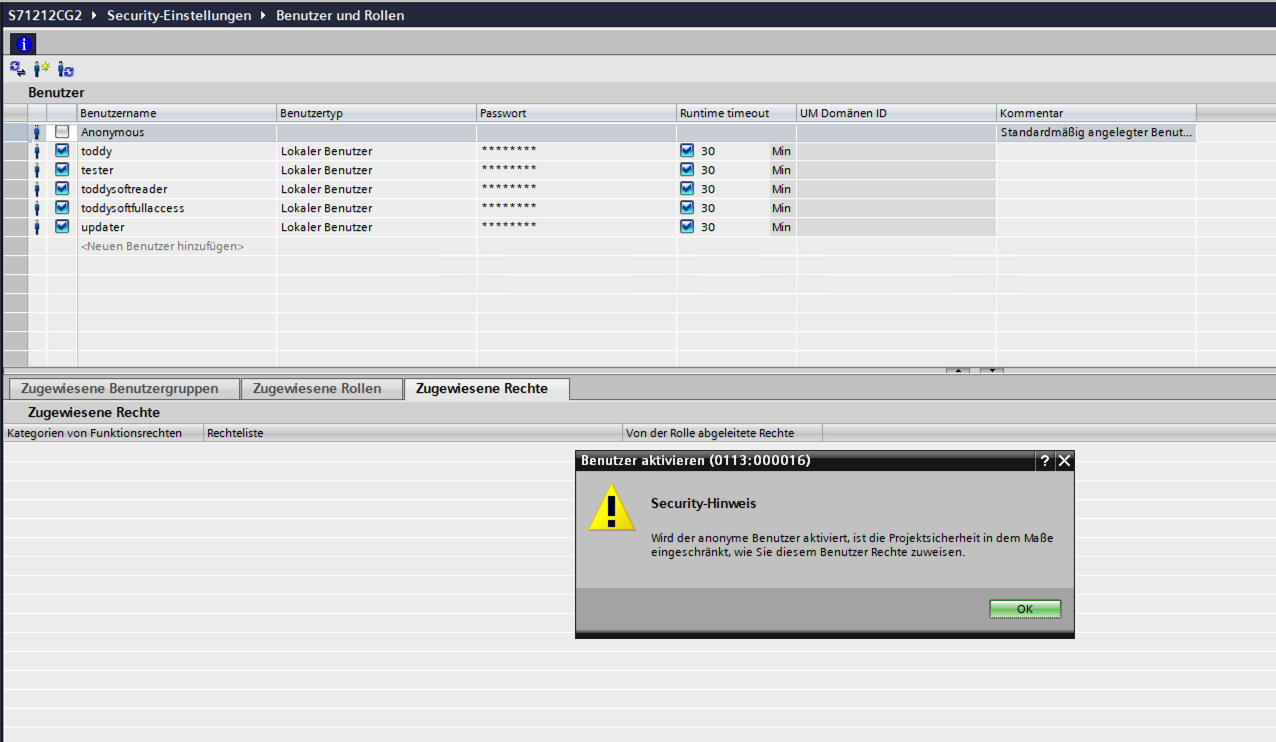 Figure 2. Step 1 — enabling the anonymous user. Siemens states the trade-off plainly: project security is restricted to the extent that you assign this user rights. 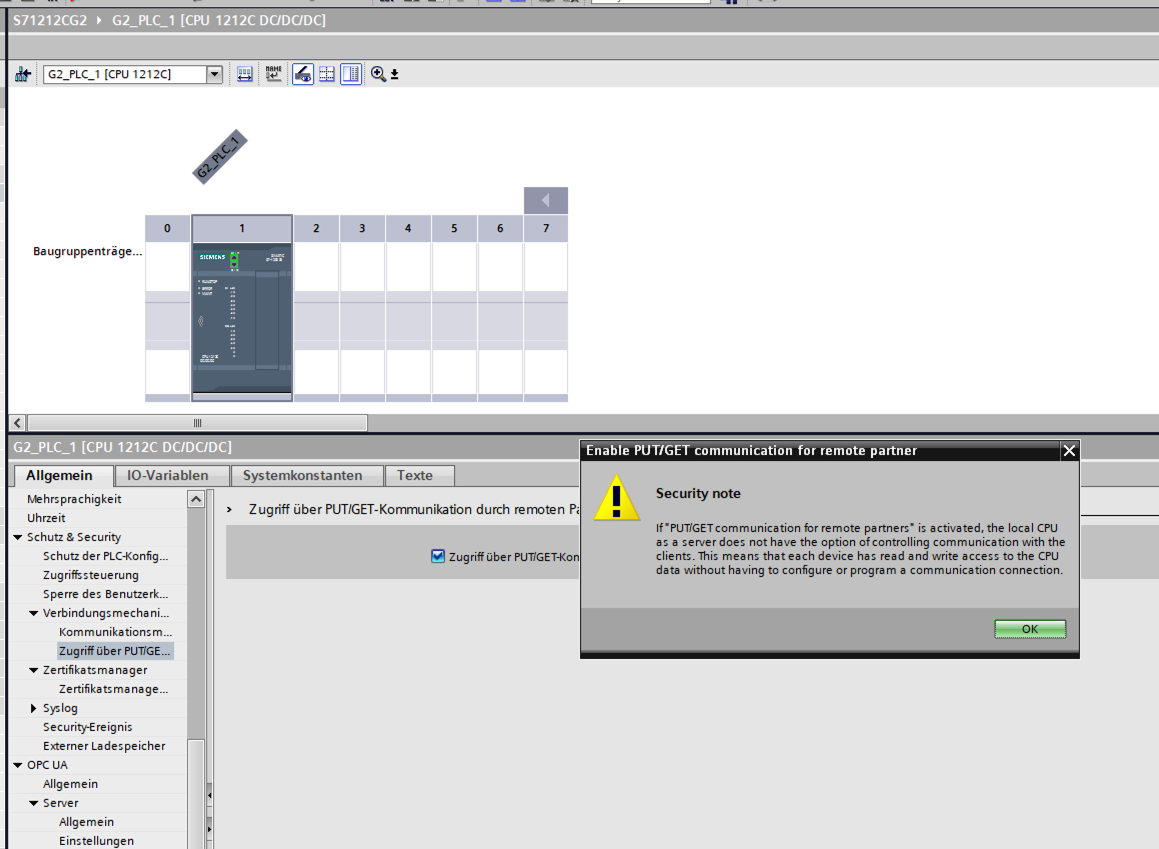 Figure 3. Step 2 — the PUT/GET permit, and what it actually concedes. Note the wording: with PUT/GET enabled the CPU "does not have the option of controlling communication with the clients", and "each device has read and write access to the CPU data without having to configure or program a communication connection." That is the vendor describing an unauthenticated read/write surface, in its own dialog. The second of those deserves emphasis, because it says in one sentence what this chapter spends pages on. "Each device has read and write access to the CPU data without having to configure or program a communication connection." No connection object, no credential, no per-tag filtering — reachability is access. Siemens is not hiding this; it is written on the dialog you have to dismiss to turn the feature on. And it is not an isolated choice — on the G2 it is a pattern, visible three times. Put the observations side by side:
Read together, those are two removals and one door that is shut until you open it — and the difference between those two shapes is worth keeping straight. Secure PG/HMI communication and the plain-HTTP binding are gone: there is no insecure alternative to select, so there is no switch to find and nothing an operator can get wrong. Legacy S7Comm is a different kind of thing — still implemented, still reachable, but shipped off, behind two confirmations and an identity to attach it to. Not removed; defaulted shut. Either way it is a materially different security posture from the older generations, where Siemens shipped the insecure alternative and left it to you to find the switch. And worth saying plainly in an article otherwise this critical. My reading of it was that this is preparation for upcoming CRA requirements, which forbid selling products with digital elements that are not secure in their default configuration — and Siemens have since indicated that the CRA is at least one aspect of it. So: a confirmed part of the motivation rather than the whole of it, which is about as much as anyone should claim about why a product line changes. Note that the mixed picture above is not a gap in that argument but a fair reading of it: the requirement is about the state a product ships in, not about making insecure operation impossible. Two capabilities removed outright, and a third available only through a deliberate, twice-warned choice, is exactly that shape. The practical takeaway for operators is simply this: "we deployed G2s" is not the same as "legacy S7Comm is unreachable here." It is unreachable until enabled — so if a plant needs the classic surface for older tooling, the door can be reopened, and the moment it is, the same exposure that applies to any other |
2.2. S7CommPlus / S7+ (0x72)
S7CommPlus (also written S7+) is the modern protocol that HMI panels, WinCC and TIA actually use today. It is symbolic / handle-based: it resolves tags by name and works regardless of optimized vs. classic block access. That combination — modern, symbolic, and unaffected by the block-access mode — is why it is the protocol most of the surprises in this series revolve around, even though the legacy protocol and the OPC UA and Web API doors get their own treatment too. It exists in several wire versions that differ mainly in how they protect the session:
V1 (
protocolVersion = 0x01) — the earliest generation. A lightweight challenge/response whose job is anti-replay, not confidentiality: the payload travels in the clear and the mechanism mainly deters naïve frame replay. As a generation it is obsolete — a tiny, old install-base — so not worth implementing today. Note already, though, that the0x01header byte is not obsolete: a modern TLS session still opens with0x01frames (InitSsl,CreateObject) before switching to0x02for data. That is the first hint that "generation" and "header byte" are two different axes — a distinction the rest of this section has to be careful with.V2 (
0x02) — the same version byte covers two genuinely different security postures, which the Rogue7 research separates as P2-minus and P2: [3]On the S7-1200 (their P2-minus) there is no integrity protection at all — same version number in the header, no cryptographic protection behind it.
On the S7-1500 (their P2) each message carries an HMAC-SHA256 under a session key. The catch is where that key comes from: a static, reproducible sequence. The authors observed "these keys are same and in the same order for all S7-1500 PLCs", published the first ten, and wrote a generator by mimicking the engineering tool’s own key-generation algorithm. So it is tamper-resistance on paper that is reproducible in practice by anyone who reads the literature.
Either way the payload is not encrypted — this is integrity and replay resistance, not confidentiality.
V3 — and here two eras both get called "V3", which is the single most confusing thing in this protocol’s history. It is worth separating them, because they differ in exactly the property this series cares about:
Era 1 — the P3 generation: integrity-protected, still plaintext. S7-1500 firmware around 1.8 through 2.x, driven by TIA V14/V15, negotiates protocol version
0x03. Rogue7 documents the protection in detail: a per-fragment HMAC-SHA256, keyed with a session key derived from the PLC’s 20-byteServerSessionChallengeplus a client-chosen Key Derivation Key, where the KDK reaches the PLC encrypted under the PLC’s elliptic-curve public key — and "the PLC firmware version determines the elliptic-curve public-key pair", shared by every PLC on that firmware. Genuine cryptography, and a real barrier to a third-party implementation, since you need key material that lives in the firmware. But note what it is not: only specific payloads (the control program’s source and binary) are encrypted. The session itself is not. Process values, addresses and the login exchange travel in the clear, integrity-protected but readable — which is precisely the "insecure PG/PC and HMI communication" this chapter’s checkbox later refers to.Era 2 — the TLS generation: the whole conversation inside TLS. Later firmware (S7-1500 from V2.9, S7-1200 from V4.5) wraps the entire S7CommPlus conversation in TLS 1.2/1.3, making it genuinely encrypted and confidential on the wire. The bespoke per-PDU integrity of era 1 becomes redundant once the transport provides it — and on the bench that is exactly what you see: inside the tunnel the frames carry
0x01(session init) and0x02(data access), with the per-PDU integrity field zeroed. Our own driver sets it to zero for that reason.That is also where the version byte stops being confusing. Siemens' account of it is that it identifies the format for the parser — which is a much narrower job than naming a generation, and once you read it that way the apparent contradiction dissolves. The product generation is V3; the frames inside the tunnel are format V2. The byte was never claiming otherwise.
Which invites an obvious reading of the sequence, and I will flag clearly that it is a reading rather than something Siemens said:
0x03looks like an attempt to improve on V2 that was not carried through. The format went back to V2, and the security moved out of the payload and into TLS instead. It would explain the short-lived0x03era on V1.8–V2.x firmware, and it would explain why the per-PDU integrity field is simply zeroed inside the tunnel — there is nothing left for it to do. The diagram labels the fifth column V2 for that reason: its siblings are labeled by the byte on the wire, and so is it.So "V3" names a product generation rather than one wire format, and the two eras sit on opposite sides of the line this series draws. Siemens' first answer here described one V3, presented with or without a TLS envelope — one generation, two presentations — and their own view was that moving to V4 would arguably have been the tidier choice but was not necessary for the implementation. They have since put it more precisely, and the second version is the one that matches what we capture: the two eras are V3 and V2 with TLS.[4] They also confirmed the S7-1200 uses the same protocol versions as the S7-1500, so a current S7-1200 sits on exactly the same footing as a current S7-1500.
(Note that even a TLS device bootstraps the upgrade with a small plaintext handshake before TLS takes over.) Siemens' own name for the TLS-wrapped mode is "Secure PG/PC and HMI communication" — a label that, by simple implication, puts V1, V2 and the entire plaintext P3 era on the non-secure side of the line. The TLS chapter picks that up.
The plaintext channel is replayable — plan for it. If your device speaks S7CommPlus without TLS (V1, V2, or early plaintext V3 on older S7-1500 firmware), treat the session as offering no meaningful confidentiality and only weak, defeated tamper/replay resistance. This is well-established public research, not a new finding: Cheng Lei et al. reverse-engineered the S7CommPlus anti-replay challenge/response and demonstrated forged/replayed control — including PLC start/stop — at Black Hat EU 2017,[5] and the Rogue7 work (cited above) extended the break to the integrity-protected generation in 2019.[6] Siemens' answers were the V3.0 session-id hardening and, on modern firmware, the TLS envelope. What to do about it:
|
Much of the S7CommPlus detail above is reverse-engineered — Siemens publishes no open specification (see the opening section). Treat the version breakdown as an accurate working model rather than a quote from a datasheet. Three points below were originally my working understanding rather than documented fact. Since publishing I sent this section to Siemens, and they have confirmed all three — I’ve left my original reasoning in place and marked each with what Siemens confirmed:
That second answer is the one to keep, because it is the one that fits the wire. The TLS era is not a variant of V3 at all — it is the V2 format with the security lifted out of the payload and into the tunnel. Which answers the question in the bullet directly: three wire formats, not four, and the current one is V2. It also retires the objection I had left standing here, that our captures show +
+
|
One equivalence to carry forward from all of this — and it is worth stating precisely, because the short version of it is easy to overstate: on the native channel, the floor is HMI access. The controller does not classify clients by what kind of tool they are. It enforces the access level carried by the credential that was presented, exactly as TIA’s access-level matrix describes, and it does so identically whoever is at the other end: a connection holding Vollzugriff is granted Vollzugriff whether it was opened by a panel, by WinCC, by TIA or by a third-party driver, and a connection presenting no credential is granted whatever the CPU’s configuration assigns to that case — on the G2, the anonymous user’s rights.
The equivalence is about the bottom of that ladder rather than the middle of it. HMI panels, WinCC and TIA all speak S7CommPlus, so this channel has to serve an operator panel’s needs to be useful at all — and HMI-Zugriff, the lowest of the three rights the matrix offers for it, already carries broad runtime tag read and write access. Measured in Read Access Doesn’t Mean Read-Only: the CPU granted HMIAccess, ReadAccess and FullAccess faithfully and distinctly to three single-right accounts — and all three read a tag and then wrote it. The levels are real; it is just that on this surface the lowest of them is not a restricted one. And when PUT/GET is enabled, the legacy protocol rides on the same channel under the same permission — as the anonymous user, with that user’s HMI access.
So the HMI column in TIA’s access-level matrix is best read as "what this access level permits on the native channel" — both protocols on it, independent of the client — rather than as "what a SIMATIC panel may do." Most of the "surprises" in those settings are really just this one fact showing through: a control that sounds like it restricts the HMI usually restricts some other surface (OPC UA, the Web API, or the TIA tool), because the native channel already is the HMI path and its lowest rung is meant to serve process data freely.
3. Not every controller has a web door
The blue HTTPS box in that figure is drawn as if every controller has one. It does not. The Web API — the JSON-RPC surface behind the web server, and the thing a third-party tool actually talks to — appeared at a specific firmware level per family, and below it the port is open and the API is simply not there. That matters for a security discussion in two directions at once: an old CPU has one door fewer to worry about, and it also has one audit surface fewer, because the Web API is where a controller will tell you about itself.
Siemens publishes the matrix themselves, in the README of their MIT-licensed .NET client library for this API.[7] It is written as "which client version do I need", but read down the columns it is a firmware map:
| S7-1500 (+ R/H) | Client library | S7-1200 G2 | S7-1200 |
|---|---|---|---|
V2.9.x | 1.0.x | V4.5.x | |
V2.9.x | 2.0.x | V4.5.x | |
V3.0.x | 2.1.x | V4.6.x | |
V3.1.x | 2.2.x | V4.7.x | |
V4.0.x | 3.0.x | V1.0.x | |
V4.1.x | 3.3.x | V4.1.x |
So the floors are S7-1500 from V2.9, S7-1200 from V4.5, and the S7-1200 G2 from its first firmware. S7-300 and S7-400 never had one at all.
Those two numbers should look familiar: they are the same firmware levels the figure above names for the TLS-era S7CommPlus column, and they come from a different Siemens source. The generation that brought encryption to the native channel is the generation that brought the Web API — which is worth knowing when you are deciding whether a plant’s fleet is "old" or "new" for the purposes of everything in this series, because one question answers both.
Read that as shared release timing, not a dependency. Nothing in the Web API needs TLS’d S7CommPlus; both simply shipped in the TIA V17 wave. And each door is separately switchable — the web server and the Web API have their own enables, and secure PG/HMI communication is its own checkbox — so a firmware at or above the floor tells you the CPU can do both, never that either is open. As a triage heuristic it is sound; as a security inference it is not, and you still have to check each door on each device.
I put six controllers from the bench against it while building a Web API driver for ToddySoft Connect, and the matrix predicted every one:
| Controller | Firmware | What answers on 443 |
|---|---|---|
S7-1200 G2 | V4.1.2 | Web API v6, TLS 1.3. Answers everything — CPU type, order number, API version, its own quantity structures. |
S7-1500 | V2.9.7 | Web API works, TLS 1.3 — but it reports almost nothing about itself: no CPU type, no API version, no quantity limits. |
S7-1200 (classic) | V4.6 | Web API works over TLS 1.2, browses 635 nodes. Also reports no CPU type. |
S7-1500 | V1.8 | Below the floor. TLS 1.2 connects, then |
S7-1200 (classic) | V2.x | Far below the floor — but it never gets that far: a fatal |
S7-300 | — | No Web API ever. Accepts TCP on 443 and then sends nothing at all — the handshake hangs for 30–45 s until the peer gives up. |
Three practical consequences fall out of that table.
A 403 here is not a permissions problem. It is the shape a missing Web API takes, and it is exactly the diagnosis an operator will chase in the wrong direction — going off to grant rights to an account on a controller that has no API to grant them on. Check the firmware version before the user role.
An open port 443 is not evidence of HTTPS. The S7-300 accepts the connection and never speaks. It does this whether Permit access only with HTTPS is set or not — and enabling that setting is not a no-op on it either: port 80 stops serving the classic pages, which it did happily before, while 443 still never answers. On that firmware the checkbox removes plain HTTP without producing a working HTTPS endpoint. A reachability scan that only asks whether a port opens will call this device healthy in both states.
Do not pin your client to TLS 1.3. Of the four that complete a handshake at all, two negotiate TLS 1.2 — and one of those is a fully working controller, not a broken one. A TLS-1.3-only client cannot reach it, and the failure it produces says nothing about protocol versions: the peer does not send an alert, it closes the connection, which surfaces as SSLHandshakeException: Remote host terminated the handshake. That reads like a certificate or firewall problem and is neither.
The self-description column is the one I did not expect. Full identity — CPU type, order number, API version, the controller’s own quantity limits — turned out to be a current-generation feature rather than a baseline one: of four controllers that served the API, only the G2 answered any of it usefully. If you are building an asset inventory on the assumption that a device with a Web API will tell you what it is, three quarters of that bench would have come back as "unknown CPU".
4. The better-behaved door is already there
This series spends most of its length on how hard the native channel is to secure — the attributes it ignores, the protection levels that do not gate runtime tag data, the TLS layer that encrypts without authenticating the client. Put the version correlation next to that and something awkward falls out.
The correlation is not that the Web API arrives wherever the native channel is weak. S7+ has been on these controllers for far longer than either. What arrives at that firmware step is the securable variant of S7+ — the TLS-wrapped one — and the Web API arrives with it, at the same level, in the same release wave. Which splits the installed base cleanly in two, and the lower half is the part worth being blunt about.
Above the floor, the native channel is hard to secure: TLS is available and can be made mandatory, but it authenticates only the controller, so you are left pinning certificates and relying on the network for the other direction. Unsatisfying — and you also have a second door that does better, which is the rest of this chapter.
Below the floor, the native channel cannot be secured at all. S7CommPlus there runs without TLS — in the clear, or on some S7-1200 V4.3/V4.4 under an older Siemens-proprietary scheme that is neither TLS nor anything you can configure. Either way there is no TLS to switch on, no certificate to pin, nothing to harden. And because the two capabilities arrive together, those same controllers have no Web API either. There is no fallback door, no better-behaved surface to steer integrators toward, no alternative of any kind on the device.
That is the more severe reading of the correlation, and it is the one that matters operationally: the fleet with the worst native-channel exposure is exactly the fleet with nothing to migrate to. For those controllers the network boundary is not the preferred control or the last control — it is the only control, and no amount of configuration on the CPU changes that. Everything below is about the half of the fleet that has a choice.
And on the three axes where the native channel disappoints, the Web API does the opposite:
No downgrade path. The JSON-RPC endpoint refuses to operate outside TLS — the same request that returns
200 OKon 443 comes back400on 80. Siemens confirm this, and that it has always been the case: there has never been a plain-HTTP Web API to fall back to, on any firmware. Compare the native channel, where plaintext S7CommPlus stays available until you tick only allow secure PG/PC and HMI communication, which is exactly why pinning a certificate there can be sidestepped by simply not using TLS.Authorization that is actually per-account. The controller reports eighteen distinct rights, and they bind: an account holding the Web API right but none of the functional ones logs in successfully and is then refused —
2 "Permission denied"— for every read, write and diagnostic call. Set that against the native channel, where the lowest rung of the access matrix already carries read and write on runtime tags, and an anonymous client with no credential at all did the same.The per-tag attributes bind.
205 "Address is read-only", measured, on a variable the same CPU cheerfully lets an S7CommPlus client overwrite.
So: is the answer simply "stop using the native channel"? No — and the reasons matter more than the recommendation.
It is the management plane, not the process-data path. Batched, the Web API costs about 1.45 ms per tag on an S7-1200 G2 and about 16 ms on a classic S7-1200 — an order of magnitude apart on the same suite. There is no push mechanism, so subscriptions are emulated by polling against a floor of about half a second, and a TCP connection answers roughly a hundred requests before the controller closes it. None of that is a defect; it is what the interface is for. It also means cyclic HMI and SCADA traffic cannot move here, so this does not retire the native-channel problem. It removes a class of traffic from it: diagnostics, occasional read/write, engineering-adjacent tooling, anything a person or a dashboard does rather than a control loop.
Certificate verification is still opt-in, and in practice usually off. The no-downgrade property is real; the certificate story is the same one as on the native channel. Siemens' own client library README suggests a validation callback that returns true unconditionally to get people started. Without pinning or an installed CA, a Web API session is as interceptable as anything else — the difference is that here you can fix it and nothing lets an attacker negotiate the protection away.
Nothing I could find throttles the login. Unauthenticated traffic sustained roughly two thousand requests a second without complaint; Api.GetQuantityStructures advertises no rate limit, and the only throttling observed anywhere was the per-connection request budget, which resets on a new socket. Api.Login sits on that same unauthenticated surface. I looked for a rate-limit rejection and did not find one, which is not proof that none exists — but until one turns up, treat the account password as guessable at whatever speed the network allows, and pick it accordingly. This is the caveat that matters most, because the argument above leans hardest on exactly that credential.
And you are switching on an HTTP-facing service. Enabling the web server to improve your security posture is a real trade, not a free win. Api.GetPermissions, for instance, answers an unauthenticated caller with 200 OK and an empty array rather than an error.
And the two doors do not cost the same, which is a security fact and not just a procurement one. The Web API comes with the web server: switching it on is a checkbox and a firmware level, and there is no runtime license to buy. The OPC UA server is licensed per CPU, in tiers scaled to the controller’s class — SIMATIC OPC UA S7-1500 Small, Medium or Large for the S7-1500 family, and SIMATIC OPC UA S7-1200 Basic for the 1200.[8]
That asymmetry matters more than it first looks. A control that has to be bought per CPU, across a fleet, is a control that in practice does not get deployed everywhere — and a protection nobody can afford to switch on protects nothing. Which is the same shape as every other finding in this series: the mechanism exists and is correctly implemented; what fails is the path from "available" to "actually in effect". If you are choosing where to put the traffic that does not have to live on the native channel, the free door has an argument the licensed one cannot answer, entirely independently of which has the better security model.
On compute cost, there are two measured numbers: what it costs to open a connection, and what it costs the running CPU. The first: a TLS handshake costs the controller between roughly 210 and 360 ms on an S7-1200 G2 or a current S7-1500, and about 3.15 seconds on the classic S7-1200. That is asymmetric cryptography running on a PLC, and on the older CPU it is slow enough to be a design constraint rather than a detail — it is why this driver renews a connection proactively between requests instead of reacting to a close. Take it as the honest scale of "how expensive is crypto on this class of hardware".
The controller also tells you it rations this interface: it reports a cap of four parallel requests and thirty concurrent sessions, closes a connection after about a hundred answered requests, and offers no push mechanism at all. Those are Siemens' own declared limits, and they read like an interface designed to be bounded rather than one meant to carry load.
The second comes from a separate benchmark, Five Doors Into One Siemens Controller. A small block in the PLC program records the mean scan cycle while a client polls 80, 500 or 2500 values at a held rate, from once every 2 s to once every 10 ms, against an idle baseline taken the same way. On an S7-1200 G2 and an S7-1511, no door cost more than 2% of the cycle at any rate the bench could drive. That covers S7Comm, S7CommPlus, OPC UA and the Web API alike.
The old S7-1212C is where the doors part company. OPC UA costs it 8% of the cycle already at one read of 80 values every 2 s, and reaches the communication cap (the share of the cycle the CPU reserves for communication, set to 20% on that bench) at one read every 500 ms. Plain S7CommPlus reaches the cap at one read every 200 ms. A client that merges its values into as few requests as possible pays 2% at that rate over S7Comm and 4% over S7CommPlus. So the practitioners' view that OPC UA is the compute-hungry door holds on old hardware. On current hardware every door stays within 2%. The Web API was not part of the cycle measurement on the old S7-1212C. If you are sizing this for a plant, measure on your oldest, busiest controller rather than your newest.
And the global protection level does not reach this door. Everything above is about what the Web API enforces once you are on it, which leaves the question of what decides whether you get on at all. The answer is: not the setting most operators would expect. Every controller on the bench sits at Kein Zugriff (Komplettschutz) — the most restrictive of the four levels, the one that credential-gates the native channel and forces PUT/GET off — or, on the G2, at the equivalent under user management. All of them still serve the Web API to an account with the appropriate web rights. The web server’s permissions are configured independently of the global level, and the global level governs the native channels only. Read that the right way round, because it is not a hole. The Web API is not left unprotected by this; it has its own authentication and its own rights model — the TIA Webserver-Zugriffsrechte tree, which One Tag, Three Checkboxes, Two Answers shows in detail. What is going on is the same thing this series keeps finding: a control that reads as a property of the controller is actually a property of one channel. An operator who ticks the strictest level and concludes the CPU is now closed has closed the native door and left a second one answering on 443, governed by a different setting on a different page. It also cuts in favour of the argument this chapter is making. Locking the native channel does not cost you the better-behaved door — the Web API keeps working, with its per-account rights intact, on a CPU where S7CommPlus now demands a credential. The two controls compose rather than collide. The matching question for OPC UA I have not tested as deliberately: its server is configured on its own page too and very likely behaves the same way, but "very likely" is not a measurement and I am not going to present it as one. |
The honest summary is not "use the Web API instead". It is that a modern S7 CPU has three doors with three different security models, the one carrying most of your traffic is the weakest of them, and the strongest controls Siemens documents are enforced on the other two — one of which additionally has to be bought.
Not that those two go unused. OPC UA in particular is deployed right across the industry, though rarely with much affection: the per-CPU license and its appetite for controller resources are standing complaints, and I have yet to meet anyone who chose it happily. The difficulty is not adoption, it is coexistence. An enforced door gets switched on beside the unenforced one rather than instead of it, and the native channel keeps answering on port 102 throughout — so the controls that work end up protecting a path much of the traffic never took, while the path it did take is governed by the attributes and levels the rest of this series is about. That is a configuration and procurement story before it is a protocol story, which is the shape of nearly everything in this series.
5. One setting behind all three doors
Almost everything in this series is channel-scoped: a control acts on one door and leaves its neighbours alone, and most of the confusion comes from assuming otherwise. There is one setting that genuinely is not, and it is worth ending on, because it protects something all three doors depend on equally.
Look at what each door relies on. The native channel, on modern firmware, is S7CommPlus inside TLS. The web server serves the pages and the Web API over HTTPS. The OPC UA server offers a UA SecureChannel with x509 certificates. Three unrelated stacks — and every one of them is only as trustworthy as the CPU’s private keys staying private. Lose those and none of the three is protecting anything: an impersonator presents genuine certificates, and a client that carefully pinned a fingerprint matches it exactly.
From TIA Portal V17 there is a password for precisely this: Vertrauliche PLC-Konfigurationsdaten schützen — the checkbox under Schutz der PLC-Konfigurationsdaten in the CPU properties. Set it.
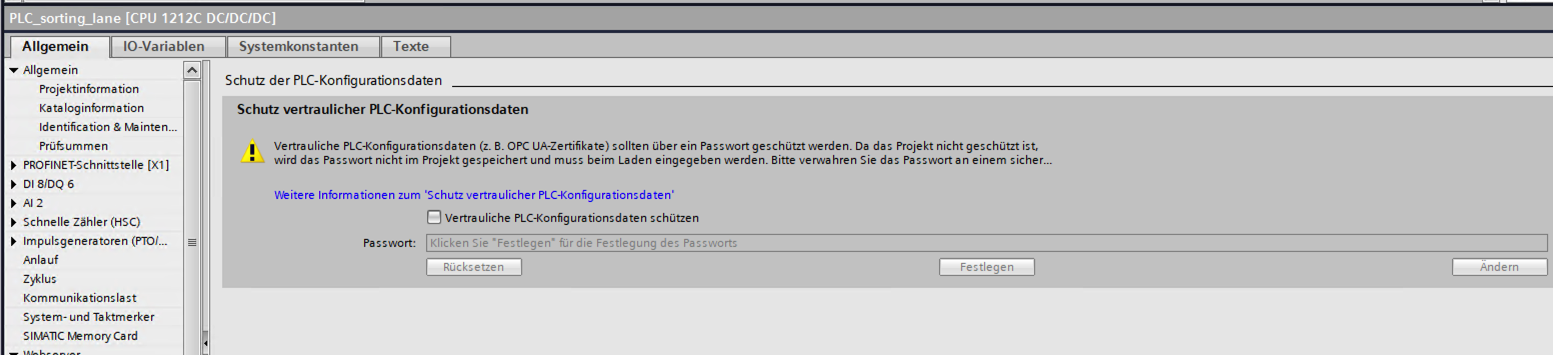
The hint text names the stakes in passing — "Vertrauliche PLC-Konfigurationsdaten (z. B. OPC UA-Zertifikate) sollten über ein Passwort geschützt werden" — and adds a practical wrinkle worth planning for: if the project is not itself protected, the password is not stored in the project and has to be entered at every download.
What it covers. Siemens defines the scope by category rather than by enumeration, and the category is, in effect, the secrets that live in the CPU’s configuration. In practice that means the private keys behind each of the doors above:
the PG/PC and HMI communication certificate — the native channel’s TLS identity;
the web server (HTTPS) certificate, which is also the Web API’s;
the OPC UA server certificate, and the client certificate where one is configured;
certificates for Secure Open User Communication (
TCON) and SMTP over TLS (TMAIL_C);and, at the fuzzier edge, PSKs and stored passwords used by those services. Siemens' FAQ wording adds "passwords" to the list without itemizing them, so treat that bullet as the boundary of what can be stated confidently rather than as a complete inventory.
The clearest proxy for the scope is what the CPU receives on download: the hardware configuration including the configured certificates for OPC UA, HTTPS, Secure OUC and Secure PG/PC and HMI communication.[9]
What it is not, because the names invite confusion. It is not know-how protection, not copy protection, not the access-level passwords, and it has nothing to do with the user program or the project file. It is at-rest confidentiality for key material in load memory, and nothing else.
On an S7-1200 G2 there is a second checkbox, and it is the one place this setting has grown since V17: Zusätzlicher Schutz herunterladbarer Konfigurationsdaten — additional protection for the downloadable configuration data, extending the same idea past the key material to the configuration as a whole. It appears from TIA V21, on that generation only, which puts it alongside the other three G2 changes this article has already collected: one more thing that generation offers and its predecessors do not.
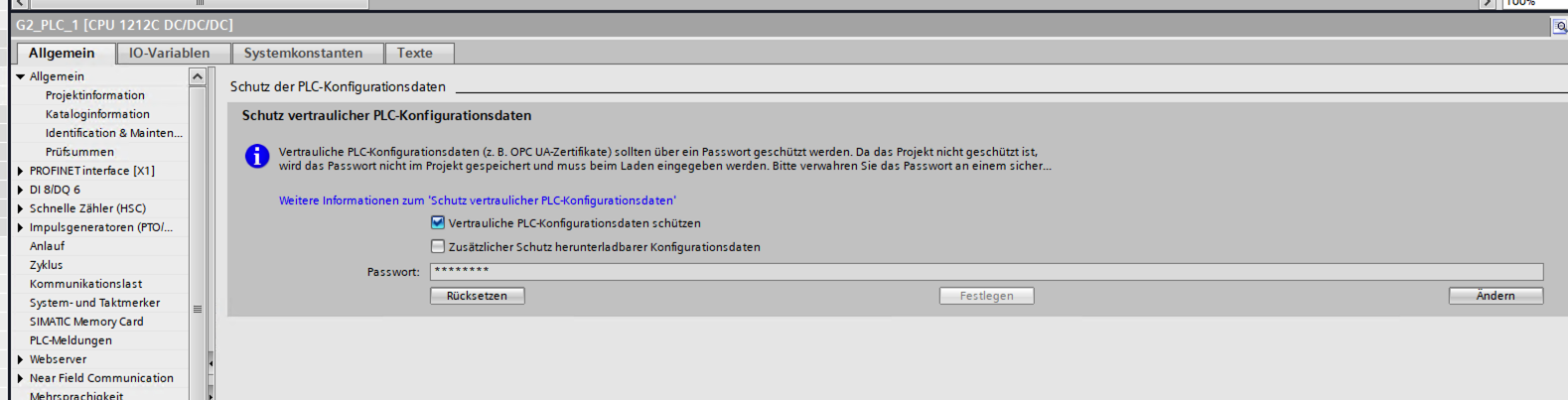
The threat model is physical, and the failure mode is silent. The project — including the confidential data — lives in load memory, which on an S7-1500 means the SIMATIC Memory Card; the key information derived from your password is held in a separate area inside the CPU, and the two must match or the CPU will not start. (S7-1200 and CPUs with no memory card use two partitions instead.) Skip the password and the CPU still leaves its provisioning phase and runs perfectly normally — nothing warns you, nothing degrades — while, in Siemens' own words, the confidential configuration data are "kaum vor unbefugtem Zugriff geschützt". Which is to say: whoever ends up holding that memory card holds your TLS private keys.
And this is not a hypothetical filed under good practice. At Black Hat USA 2024 a Technion team presented "Nope, S7ill not Secure: Stealing Private Keys From S7 PLCs", in which a hardware-configuration upload hands over the PLC’s private key — the exact outcome the paragraph above describes, demonstrated rather than reasoned about. (Mind the direction: in TIA, an upload copies data from the PLC to the PC, which IT would call a download.) That vector is closed by this password, and was closed before the talk: the protection shipped in TIA V17. Which turns the recommendation from hygiene into something more specific — this setting is the difference between a published key-extraction technique working on your controller and not. Encrypted, but Not Authenticated has the detail and the remediation status.
For a series that keeps finding controls narrower than their labels, this is the pleasant inverse — a single checkbox whose effect is genuinely controller-wide. It also sits directly underneath that article’s central advice: pinning a controller’s certificate is the one direction of authentication available to you, and a pin is worth exactly what the secrecy of the corresponding key is worth.
6. Where to go next
With the doors mapped, the rest of the series takes up what happens at each of them. This is the order they are meant to be read in — the evidence pieces first, then the argument they support.
One Tag, Three Checkboxes, Two Answers takes one concrete control — the three per-variable access checkboxes every DB member carries — and shows the same tag on the same CPU answering two different ways depending only on which of the doors above you knock at. It is the series' clearest demonstration of why the map matters.
Read Access Doesn’t Mean Read-Only works through the settings an operator actually reaches for — the four global protection levels and the named-user model that replaces them on the newest CPUs. The short version is that they gate the engineering and block surface rather than runtime tag data, which stays readable and writable at every level except the strictest; the article measures each rung, including the one called read access.
Encrypted, but Not Authenticated: TLS on the S7 PG/HMI Channel takes the single amber column here and asks what it is worth. Short answer: genuine confidentiality against a passive listener, no endpoint authentication in the direction that would keep a stranger off the wire, and a login mechanism that an active man-in-the-middle relays without ever learning the password.
Security That Lives in the Tool, Not the PLC is where the series lands, and it reads best last. Siemens had a choice about where to enforce the finer-grained S7 protections — down in the CPU firmware and the wire protocol, or up in the engineering tool — and again and again chose the tool. For as long as TIA Portal was the only thing that could speak the protocol that was a complete implementation rather than a shortcut; reverse engineering broke the assumption underneath it. That article sorts every control in this series into what the device enforces, what only the tool enforces, and the awkward middle category that is real enforcement on a door your client never uses. It closes with the two changes that would most improve these controllers.
7. About
ToddySoft Connect is an industrial connectivity library: a set of protocol drivers that let applications read, write, browse and subscribe to data on automation hardware. Everything measured in this series was measured with it — the S7 driver first, and later the S7 Web API driver, which began as a way to verify a single claim in these articles and turned into a second Siemens driver in its own right. The bench behind the numbers is real hardware: S7-1500, S7-1200 and S7-1200 G2 controllers, plus an S7-300 for the cases where the answer is "that generation does not do this at all".
Christofer Dutz has spent more than a decade on industrial protocols and IT/OT integration, much of it in open source. Questions, corrections and war stories are welcome — particularly corrections: several findings in this series were sharpened by people who knew more about a corner of it than he did.
On the writing: this series took shape over about seven weeks and was restructured, split and rewritten far more often than anyone would manage by hand — what began as one article ended up as six. An AI assistant did the heavy lifting on the prose. It decided nothing: every finding, every number and every conclusion here came off the bench first and was checked back against it afterward. Where the text and the hardware disagreed, the hardware won.
0x01 and 0x02 frames inside the TLS era and never 0x03, and the S7 mspec this driver is built from defines no 0x03 frame type at all — which sat awkwardly against a generation-level statement about "one V3". With the version byte understood as a parser-format selector, and the TLS era as V2 rather than V3, the vendor statement and the header bytes agree.siemens/simatic-s7-webserver-api, https://github.com/siemens/simatic-s7-webserver-api/ — the Compatibility section. The client-version column is theirs; the reading of it as a per-family firmware floor is mine.6ES7823-0BA00-1BA0 / -1CA0 / -1DA0 for the S7-1500 tiers and 6ES7823-0BA00-2BA0 for the S7-1200. I am deliberately not quoting prices — they are region- and reseller-dependent — but the tier is chosen by CPU class, and on a small controller the license is a substantial fraction of what the controller itself cost.